Environment used in this article. The example was implemented on SAP HANA 2.0 SPS 05 revision 55, using the SYSTEMDB. The same procedure can be applied to a tenant database. The example uses LDAP without SSL and creates SAP HANA users explicitly rather than enabling automatic LDAP user creation.
1. Introduction
This article describes how to configure SAP HANA to authenticate users against Microsoft Active Directory and obtain their SAP HANA authorizations from Active Directory group membership.
The example implements two levels of access:
- Basic DBA: can monitor SAP HANA.
- Power DBA: can monitor SAP HANA and change system parameters.
Three Active Directory users are used:
binduser: a regular AD account used by SAP HANA to retrieve information about other directory users and groups. It does not need to belong to either DBA group.basic_dba: a user assigned to the AD groupgrp_basic_dba.power_dba: a user assigned to the AD groupgrp_power_dba.
The Active Directory domain used in the example is lab.group.
2. Identify the Active Directory objects
Before creating the LDAP provider, determine the distinguished names (DNs) of the bind user, the two DBA users, and the two AD groups.
2.1 Determine the bind-user DN
From a domain controller or a Windows domain member with the Active Directory command-line tools installed, use dsquery to locate the bind user:
Command
C:\Users\lab.LAB>dsquery user -name bind*Expected result
"CN=Bind User,CN=Users,DC=lab,DC=group"2.2 Validate the bind user with ldapsearch
Use ldapsearch from a Linux system, including the SAP HANA server if the tool is available there. The command prompts for the bind user's Active Directory password:
Command
ldapsearch -b \
  "CN=Bind User,CN=Users,DC=lab,DC=group" \
  -D "CN=Bind User,CN=Users,DC=lab,DC=group" \
  -H ldap://dc1.lab.group \
  -x -W
Expected result excerpt
Enter LDAP Password:
# extended LDIF
#
# LDAPv3
# base <CN=Bind User,CN=Users,DC=lab,DC=group> with scope subtree
# filter: (objectclass=*)
# requesting: ALL
#
# Bind User, Users, lab.group
dn: CN=Bind User,CN=Users,DC=lab,DC=group
...
The bind-user DN appears twice in the command. The value supplied with -b identifies the directory object being searched. The value supplied with -D identifies the account used to authenticate to Active Directory and perform the search.
2.3 Retrieve the remaining user and group DNs
Repeat the search for the two AD groups and the two DBA users. The group DNs will be required later when the SAP HANA roles are mapped to Active Directory groups.
Commands
ldapsearch -b \
  "CN=grp_basic_dba,OU=Groups,DC=lab,DC=group" \
  -D "CN=Bind User,CN=Users,DC=lab,DC=group" \
  -H ldap://dc1.lab.group -x -W

ldapsearch -b \
  "CN=grp_power_dba,OU=Groups,DC=lab,DC=group" \
  -D "CN=Bind User,CN=Users,DC=lab,DC=group" \
  -H ldap://dc1.lab.group -x -W

ldapsearch -b \
  "CN=basic dba,CN=Users,DC=lab,DC=group" \
  -D "CN=Bind User,CN=Users,DC=lab,DC=group" \
  -H ldap://dc1.lab.group -x -W

ldapsearch -b \
  "CN=power dba,CN=Users,DC=lab,DC=group" \
  -D "CN=Bind User,CN=Users,DC=lab,DC=group" \
  -H ldap://dc1.lab.group -x -W
3. Create and validate the LDAP provider
3.1 Create the provider
Create the LDAP provider in SAP HANA with the bind-user credentials, the AD user-search base, and the attributes that SAP HANA will use for the user DN and group membership.
SQL statement
CREATE LDAP PROVIDER LDAP_LAB
CREDENTIAL TYPE 'PASSWORD' USING
  'user=CN=Bind User,CN=Users,DC=lab,DC=group;password=BindUserPassword'
USER LOOKUP URL
  'ldap://dc1.lab.group:389/CN=Users,DC=lab,DC=group??sub?(&(objectClass=user)(sAMAccountName=*))'
ATTRIBUTE DN 'distinguishedName'
ATTRIBUTE MEMBER_OF 'memberOf'
SSL OFF
DEFAULT ON
ENABLE PROVIDER
-- ENABLE USER CREATION FOR LDAP
The automatic-user-creation clause is included only as a commented reference. In this implementation, users are created explicitly in each SAP HANA database.
The example also uses SSL OFF, so no Active Directory certificate is imported into SAP HANA.
Security context from the original implementation. The article references CVE-2021-21484 and SAP KBA 3017378, which describe an LDAP authentication bypass affecting some SAP HANA versions. The implementation therefore left automatic LDAP user creation disabled.
Expected result
Statement 'CREATE LDAP PROVIDER LDAP_LAB CREDENTIAL TYPE 'PASSWORD' USING ...'

successfully executed in 14 ms 696 µs
(server processing time: 8 ms 327 µs) - Rows Affected: 0
3.2 Validate the provider
Validate the LDAP provider after it has been created:
SQL statement
VALIDATE LDAP PROVIDER LDAP_LAB;Expected result
Statement 'VALIDATE LDAP PROVIDER LDAP_LAB'

successfully executed in 17 ms 201 µs
(server processing time: 8 ms 697 µs) - Rows Affected: 0
3.3 Troubleshoot bind failures
A bind or credential problem may produce an error similar to:
Example error
Could not execute 'VALIDATE LDAP PROVIDER LDAP_LAB'
in 66 ms 781 µs

SAP DBTech JDBC: [4200]: Validate LDAP provider
failed because of internal error: Unable to bind with
LDAP provider LDAP_LAB.
Increase the LDAP trace level to obtain additional diagnostic information:
SQL statement
ALTER SYSTEM ALTER CONFIGURATION
  ('global.ini', 'SYSTEM')
  SET ('trace', 'ldap') = 'debug'
  WITH RECONFIGURE;
Additional information is written to the nameserver*.trc files when the provider is configured in the SYSTEMDB, or to the indexserver*.trc files when it is configured in a tenant database.
4. Map AD groups to SAP HANA roles
4.1 Validate users before role mapping
Before creating the role mappings, validate that the provider can find both users without performing an authorization check:
SQL statements
VALIDATE LDAP PROVIDER LDAP_LAB
  CHECK USER BASIC_DBA
  NO AUTHORIZATION CHECK;

VALIDATE LDAP PROVIDER LDAP_LAB
  CHECK USER POWER_DBA
  NO AUTHORIZATION CHECK;
If NO AUTHORIZATION CHECK is removed before the LDAP groups have been mapped to SAP HANA roles, validation fails because SAP HANA cannot identify any roles associated with the user's AD groups:
Expected authorization error before mapping
Could not execute 'VALIDATE LDAP PROVIDER LDAP_LAB
CHECK USER POWER_DBA'

SAP DBTech JDBC: [4200]: Validate LDAP provider
failed because of internal error: No roles mapped for
the LDAP groups user POWER_DBA is part of
4.2 Create the LDAP group role mappings
Create two SAP HANA roles and map each role to the corresponding Active Directory group. Users who belong to those groups will implicitly receive the mapped SAP HANA roles when authorization through LDAP is enabled.
SQL statements
CREATE ROLE Z_POWER_DBA LDAP GROUP
  'CN=grp_power_dba,OU=Groups,DC=lab,DC=group';

CREATE ROLE Z_BASIC_DBA LDAP GROUP
  'CN=grp_basic_dba,OU=Groups,DC=lab,DC=group';
The user-validation statements that previously failed should now complete successfully:
SQL statements
VALIDATE LDAP PROVIDER LDAP_LAB CHECK USER BASIC_DBA;
VALIDATE LDAP PROVIDER LDAP_LAB CHECK USER POWER_DBA;
4.3 Grant privileges to the mapped roles
Grant monitoring access to both roles and parameter-administration access only to the power-DBA role:
SQL statements
GRANT MONITORING TO Z_BASIC_DBA;

GRANT MONITORING TO Z_POWER_DBA;
GRANT INIFILE ADMIN TO Z_POWER_DBA;
5. Create the SAP HANA users
LDAP authentication does not remove the need for a corresponding user in SAP HANA unless automatic user creation is enabled. The SAP HANA user acts as the local identity linked to the directory user rather than as a password-authenticated database user.
5.1 Create users explicitly
Create the two users with LDAP identities and LDAP-based authorization:
SQL statements
CREATE USER BASIC_DBA
  WITH IDENTITY FOR LDAP PROVIDER
  AUTHORIZATION LDAP;

CREATE USER POWER_DBA
  WITH IDENTITY FOR LDAP PROVIDER
  AUTHORIZATION LDAP;
Important authorization clause. The original implementation found that AUTHORIZATION LDAP is required for SAP HANA to assign the roles mapped to the user's Active Directory groups. If this clause is omitted, the user may authenticate but will not receive the mapped SAP HANA roles automatically.
5.2 Optional automatic user creation
The provider can be changed so that SAP HANA creates an LDAP user automatically on the user's first connection:
SQL statement
ALTER LDAP PROVIDER LDAP_LAB
  ENABLE USER CREATION FOR LDAP;
This option was not enabled in the example. The implementation explicitly created users only in databases for which they had a business reason to connect.
6. Validate authentication and authorization
6.1 Connect through SAP HANA Studio
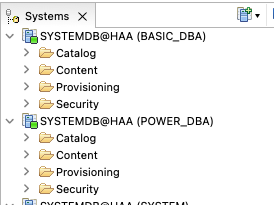
Create SAP HANA Studio connections for BASIC_DBA and POWER_DBA, using each user's Active Directory password.
6.2 Validate the monitoring-only user
Because BASIC_DBA receives the MONITORING role through Z_BASIC_DBA, the user can open the Administration view and query monitoring information:
SQL query
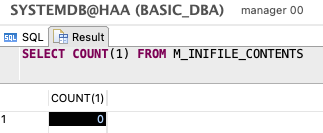
SELECT COUNT(1) FROM M_INIFILE_CONTENTS;The original test observed approximately 1,900 rows in the SYSTEMDB and approximately 900 rows in a tenant database when the user had MONITORING or CATALOG READ. A result of zero can indicate that the LDAP role mapping was not applied.
The following example shows BASIC_DBA created without AUTHORIZATION LDAP. SAP HANA therefore did not assign Z_BASIC_DBA, and the query returned zero rows.
The monitoring-only user should not be able to change a system parameter:
SQL statement
ALTER SYSTEM ALTER CONFIGURATION
  ('global.ini', 'SYSTEM')
  SET ('execution', 'max_concurrency') = '32';
Expected error
Could not execute 'ALTER SYSTEM ALTER CONFIGURATION
('global.ini', 'SYSTEM') SET ('execution',
'max_concurrency') = ...'

SAP DBTech JDBC: [258]: insufficient privilege:
Detailed info for this error can be found with guid
'3111BFBA6581354FA7FF07934AE029B6'
6.3 Diagnose the insufficient-privilege error
Use the GUID returned by SAP HANA to retrieve the missing privilege:
SQL statement
CALL SYS.GET_INSUFFICIENT_PRIVILEGE_ERROR_DETAILS
  ('3111BFBA6581354FA7FF07934AE029B6', ?);
INIFILE ADMIN as the missing privilege.6.4 Validate the parameter-administration user
POWER_DBA can perform the monitoring activities available to BASIC_DBA and can also update system parameters because Z_POWER_DBA includes INIFILE ADMIN.
Expected result
Statement 'ALTER SYSTEM ALTER CONFIGURATION
('global.ini', 'SYSTEM') SET ('execution',
'max_concurrency') = ...'

successfully executed in 13 ms 578 µs
(server processing time: 6 ms 741 µs) - Rows Affected: 0
7. Conclusion
The roles in this example demonstrate how SAP HANA authorization can be controlled through Active Directory group membership. Multiple AD groups can be mapped to multiple SAP HANA roles, allowing user authorization to be managed centrally rather than repeated independently across several systems.
The validation confirms the complete path: the LDAP provider authenticates the directory users, AD group membership supplies the mapped SAP HANA roles, and the privileges assigned to those roles distinguish monitoring-only access from parameter-administration access.