Scope of this article. This second part continues the SAP IQ preparation described in Part I and covers the remaining SAP HANA and NetWeaver configuration, followed by the backup and restore procedures used in the example environment.
9. Installation and configuration of IQ and HANA clients
The client installations below follow the SAP guidance used for the implementation. However, no operational need was identified for installing the IQ client on the HANA server: communication between HANA and IQ requires the SDA package. Likewise, no connection initiated from the IQ server to HANA was identified, so the HANA client on the IQ server is also marked as optional.
9.1 IQ client on application servers
Logged in as the SAP user nw1adm, create the client installation directory:
Command
mkdir /usr/sap/NW1/siqclientExpected result
serverappl:nw1adm 51> mkdir /usr/sap/NW1/siqclient
serverappl:nw1adm 52>
Extract IQNC161004P_7-80002768.TGZ. This creates the ebf29678 directory. Run setup.bin, use /usr/sap/NW1/siqclient as the installation directory, and select the Typical installation set.
Command
./setup.binExpected result
serverappl:nw1adm 54> ./setup.bin
Preparing to install
Extracting the JRE from the installer archive...
Unpacking the JRE...
Extracting the installation resources from the installer archive...
Configuring the installer for this system's environment...
Launching installer...

Graphical installers are not supported by the VM. The console mode will be used instead...

===============================================================
SAP IQ Client Suite
(created with InstallAnywhere)
---------------------------------------------------------------
Preparing CONSOLE Mode Installation...

===============================================================
Introduction
------------
InstallAnywhere will guide you through the installation of SAP IQ Client Suite 16.1 SP04.07 (64-bit).

It is strongly recommended that you quit all programs before continuing with this installation.

Respond to each prompt to proceed to the next step in the installation. If you want to change something on a previous step, type 'back'.

You may cancel this installation at any time by typing 'quit'.

PRESS <ENTER> TO CONTINUE:

===============================================================
Choose Install Folder
---------------------
Where would you like to install?

Default Install Folder:

ENTER AN ABSOLUTE PATH, OR PRESS <ENTER> TO ACCEPT THE DEFAULT
    : /usr/sap/NW1/siqclient

INSTALL FOLDER IS: /usr/sap/NW1/siqclient
IS THIS CORRECT? (Y/N): y

===============================================================
Choose Install Set
------------------
Please choose the Install Set to be installed by this installer.

  ->1- Typical
    2- Customize...

ENTER THE NUMBER FOR THE INSTALL SET, OR PRESS <ENTER> TO ACCEPT THE DEFAULT
    :

===============================================================
End-user License Agreement
--------------------------
 1) Americas and Asia Pacific                    2) Argentina
 3) Asia Pacific Region - General                4) Australia
 5) Belgium(English)                             6) Brazil
 7) Canada                                       8) Denmark
 9) Europe,Middle East, and Africa - General    10) France(English)
11) France(French)                              12) Germany(English)
13) Hong Kong                                   14) India
15) Italy(English)                              16) Italy(Italian)
17) Japan                                       18) Korea
19) Latin America Countries - Other than Argentina
                                                20) Malaysia
21) Mexico                                      22) Netherlands
23) New Zealand                                 24) Norway
25) People's Republic of China(PRC)             26) Singapore
27) South Africa                                28) Spain(English)
29) Spain(Spanish)                              30) Sweden
31) Switzerland(English)                        32) Taiwan
33) United Kingdom                              34) United States of America
35) Any Other Locations

Please enter the number of the location you are installing. (1-35) (Default: 1): 6

CONTRATO DE LICENÇA DE USO DE SOFTWARE

AVISO IMPORTANTE: Leia atentamente este Contrato de Licença antes de usar o Programa aqui contido. Você poderá usar o Programa adquirido somente no Brasil, e apenas em conformidade com os termos e condições do presente instrumento. SE VOCÊ NÃO CONCORDAR EM SE SUBMETER AOS TERMOS E CONDIÇÕES AQUI ESTABELECIDOS, VOCÊ NÃO PODERÁ USAR O PROGRAMA. Ao fazer o download, instalar ou usar o Programa de qualquer forma, Você está dando ciência que Você já leu, entendeu e concordou com os termos deste Contrato. Se Você não concordar com estes termos, apresente seu recibo ou outro comprovante de compra, juntamente com a mídia do Programa, Documentação e embalagem (se houver) à empresa da qual Você comprou este produto dentro de 30 (trinta) dias para solicitar o reembolso. ISTO É UMA LICENÇA, NÃO UMA VENDA.

Press ENTER to read the text [Type 'back' and press ENTER to skip the text]
    : back

I agree to the terms of the SAP license for the install location specified.
    (Y/N): y

===============================================================
Pre-Installation Summary
------------------------
Please Review the Following Before Continuing:

Product Name:
    SAP IQ Client Suite 16.1 SP04.07 (64-bit)

Install Folder:
    /usr/sap/NW1/siqclient

Product Features:
    SAP IQ Client,
    SAP IQ ODBC Driver,
    SAP IQ,
    SAP IQ Web Drivers,
    SAP jConnect

Disk Space Information (for Installation Target):
    Required:   353,936,090 Bytes
    Available: 8,266,391,552 Bytes

PRESS <ENTER> TO CONTINUE:

===============================================================
Ready To Install
----------------
InstallAnywhere is now ready to install SAP IQ Client Suite 16.1 SP04.07 (64-bit) onto your system at the following location:

    /usr/sap/NW1/siqclient

PRESS <ENTER> TO INSTALL:

===============================================================
Installing...
-------------
[==================|==================|==================|==================]
[------------------|------------------|------------------|------------------]

===============================================================
Install Complete
----------------
The installation was successful. SAP IQ Client Suite 16.1 SP04.07 (64-bit) has been installed to:

/usr/sap/NW1/siqclient

serverappl:nw1adm 55>
Confirm that dbsybslib.so exists in the SAP executable directories. The file is available in the SAPEXEDB kernel package, including HANA-based systems.
Command
find /sapmnt/NW1 -name dbsybslib.so -ls
find /usr/sap/NW1 -name dbsybslib.so -ls
Expected result
serverappl:nw1adm 7> find /sapmnt/NW1 -name dbsybslib.so -ls
9171477 2824 -rwxr-xr-x 1 nw1adm sapsys 2891430 Dec 24 2019 /sapmnt/NW1/exe/uc/linuxx86_64/dbsybslib.so
serverappl:nw1adm 7> find /usr/sap/NW1 -name dbsybslib.so -ls
226507412 2824 -rwxr-xr-x 1 nw1adm sapsys 2891430 Dec 24 2019 /usr/sap/NW1/D02/exe/dbsybslib.so
serverappl:nw1adm 8>
Add the following environment variables to /home/nw1adm/.cshrc:
Configuration
setenv ODBC_IQ libdbodbc17_r.so
setenv LD_LIBRARY_PATH ${LD_LIBRARY_PATH}:/usr/sap/NW1/siqclient/IQ-16_1/lib64/
setenv IQDIR16 /usr/sap/NW1/siqclient/IQ-16_1
Log off and back on, then validate the variables:
Command
echo $ODBC_IQ
echo $LD_LIBRARY_PATH
echo $IQDIR16
Expected result
serverappl:nw1adm 51> echo $ODBC_IQ
libdbodbc17_r.so
serverappl:nw1adm 52> echo $LD_LIBRARY_PATH
/usr/sap/NW1/SYS/exe/run:/usr/sap/NW1/SYS/exe/uc/linuxx86_64:/usr/sap/NW1/hdbclient:/usr/sap/NW1/hdbclient/:/usr/sap/NW1/siqclient/IQ-16_1/lib64/
serverappl:nw1adm 53> echo $IQDIR16
/usr/sap/NW1/siqclient/IQ-16_1
serverappl:nw1adm 54>
9.2 HANA client on the IQ server (optional)
Extract IMDB_CLIENT20_004_202-80002082.SAR and run hdbinst from the SAP_HANA_CLIENT directory. Use /usr/sap/NLS/hdbclient as the installation directory.
Command
./hdbinstExpected result
sybase@servernls:/tmp/hana_cli/SAP_HANA_CLIENT> ./hdbinst
SAP HANA Database Client installation kit detected.

SAP HANA Lifecycle Management - Client Installation 2.4.202.1590784230
**********************************************************************

Enter Installation Path [/home/sybase/sap/hdbclient]: /usr/sap/NLS/hdbclient
Checking installation...
Preparing package 'Product Manifest'...
Preparing package 'SQLDBC'...
Preparing package 'REPOTOOLS'...
Preparing package 'Python DB API'...
Preparing package 'Python Machine Learning API'...
Preparing package 'ODBC'...
Preparing package 'R Machine Learning API'...
Preparing package 'JDBC'...
Preparing package 'HALM Client'...
Preparing package 'DBCAPI'...
Preparing package 'node.js Client'...
Preparing package 'golang Client'...
Preparing package 'Ruby Client'...
Preparing package 'CommonCryptoLib'...
Preparing package 'Environment Script'...
Preparing package 'Client Installer'...
Installing SAP HANA Database Client to /usr/sap/NLS/hdbclient...
Installing package 'Product Manifest'...
Installing package 'SQLDBC'...
Installing package 'REPOTOOLS'...
Installing package 'Python DB API'...
Installing package 'Python Machine Learning API'...
Installing package 'ODBC'...
Installing package 'R Machine Learning API'...
Installing package 'JDBC'...
Installing package 'HALM Client'...
Installing package 'DBCAPI'...
Installing package 'node.js Client'...
Installing package 'golang Client'...
Installing package 'Ruby Client'...
Installing package 'CommonCryptoLib'...
Installing package 'Environment Script'...
Installing package 'Client Installer'...
Installation done
Log file written to '/var/tmp/hdb_client_2020-11-06_17.31.24_1405/hdbinst_client.log' on host 'servernls'.
sybase@servernls:/tmp/hana_cli/SAP_HANA_CLIENT>
Add the following line to /home/sybase/.profile:
Configuration
export LD_LIBRARY_PATH=/usr/sap/NLS/hdbclient:$LD_LIBRARY_PATHLog off and back on, then validate the variable:
Command
echo $LD_LIBRARY_PATHExpected result
sybase@servernls:~> echo $LD_LIBRARY_PATH
/usr/sap/NLS/hdbclient:/usr/sap/NLS/server/IQ-16_1/lib64:/usr/sap/NLS/server/OCS-16_0/lib:/usr/sap/NLS/server/OCS-16_0/lib3p64:/usr/sap/NLS/server/OCS-16_0/lib3p:
sybase@servernls:~>
9.3 IQ client on HANA servers (optional)
Using the HANA operating-system user ha1adm, create the IQ client directory:
Command
mkdir /usr/sap/HA1/siqclientExpected result
ha1adm@serverhana:/usr/sap/HA1/HDB24> mkdir /usr/sap/HA1/siqclient
ha1adm@serverhana:/usr/sap/HA1/HDB24>
Extract IQNC161004P_7-80002768.TGZ, run setup.bin from the resulting ebf29678 directory, use /usr/sap/HA1/siqclient as the installation directory, and select the Typical installation set. The installation flow and expected output are the same as in section 9.1.
9.4 SDA on HANA servers
Extract IMDB_SDA200_05_0-70002151.SAR and install the HANA SDA drivers:
Command
./install.sh -s HA1Expected result
ha1adm@serverhana:/tmp/sda> ./install.sh -s HA1
Removing old driver files from /hana/shared/HA1/federation ...
ha1adm@serverhana:/tmp/sda>
Create a symbolic link to the federation directory under /usr/sap/HA1:
Command
ln -s /hana/shared/HA1/federation /usr/sap/HA1/federationExpected result
ha1adm@serverhana:/usr/sap/HA1/HDB24> ln -s /hana/shared/HA1/federation /usr/sap/HA1/federation
ha1adm@serverhana:/usr/sap/HA1/HDB24>
Add the following variables to /usr/sap/HA1/home/.profile:
Configuration
export ODBC_IQ=libdbodbc17_r.so
export LD_LIBRARY_PATH=$LD_LIBRARY_PATH:/usr/sap/HA1/federation/
export LD_LIBRARY_PATH=$LD_LIBRARY_PATH:/usr/sap/HA1/siqclient/IQ-16_1/lib64
Log off and back on, then validate the variables:
Command
echo $ODBC_IQ
echo $LD_LIBRARY_PATH
Expected result
ha1adm@serverhana:/usr/sap/HA1/HDB24> echo $ODBC_IQ
libdbodbc17_r.so
ha1adm@serverhana:/usr/sap/HA1/HDB24> echo $LD_LIBRARY_PATH
/usr/sap/HA1/HDB24/exe/krb5/lib/krb5/plugins/preauth:/usr/sap/HA1/HDB24/exe/krb5/lib:/usr/sap/HA1/HDB24/exe:/usr/sap/HA1/HDB24/exe/Python/lib:/usr/sap/HA1/HDB24/exe/filter:/usr/sap/HA1/HDB24/exe/dat_bin_dir:/usr/sap/HA1/HDB24/exe/plugins/afl:/usr/sap/HA1/HDB24/exe/plugins/lcapps:/usr/sap/HA1/HDB24/exe/plugins/repository:/usr/sap/HA1/HDB24/exe/plugins/epmmds:/usr/sap/HA1/SYS/global/hdb/federation:/usr/sap/HA1/SYS/global/hdb/plugins/3rd_party_libs:/usr/sap/HA1/federation/:/usr/sap/HA1/siqclient/IQ-16_1/lib64
ha1adm@serverhana:/usr/sap/HA1/HDB24>
Because these steps change environment variables on the HANA, NetWeaver, and IQ hosts, log off and back on and restart all three systems after completing the configuration.
10. Settings in HANA
10.1 Setting up the remote source in HANA
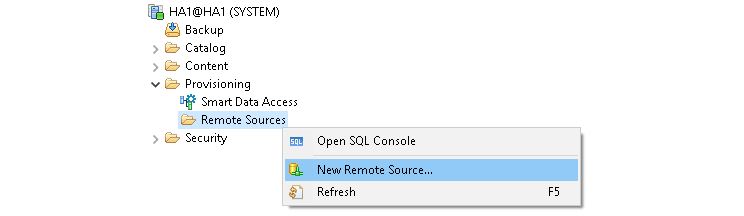
Connect to the HA1 system, navigate to Provisioning, right-click Remote Sources, and select New Remote Source.
Fill in the remote-source fields with the following values:
Remote source values
Source Name: SAPIQDB
Adapter Name: IQ (ODBC)
Driver: libdbodbc17_r.so
Extra Adapter Properties: EngineName=SAPIQSERVER;DatabaseName=SAPIQDB;CommLinks=tcpip(host=servernls,port=34238);
User Name: SAPBWNLS
Password: MyPassword
The remote source can also be created with SQL:
SQL command
CREATE REMOTE SOURCE "SAPIQDB" ADAPTER "iqodbc"
CONFIGURATION 'Driver=libdbodbc17_r.so;dmlmode=readonly;EngineName=SAPIQSERVER;DatabaseName=SAPIQDB;CommLinks=tcpip(host=servernls,port=34238);'
WITH CREDENTIAL TYPE 'PASSWORD'
USING 'user=SAPBWNLS;password=MyPassword';
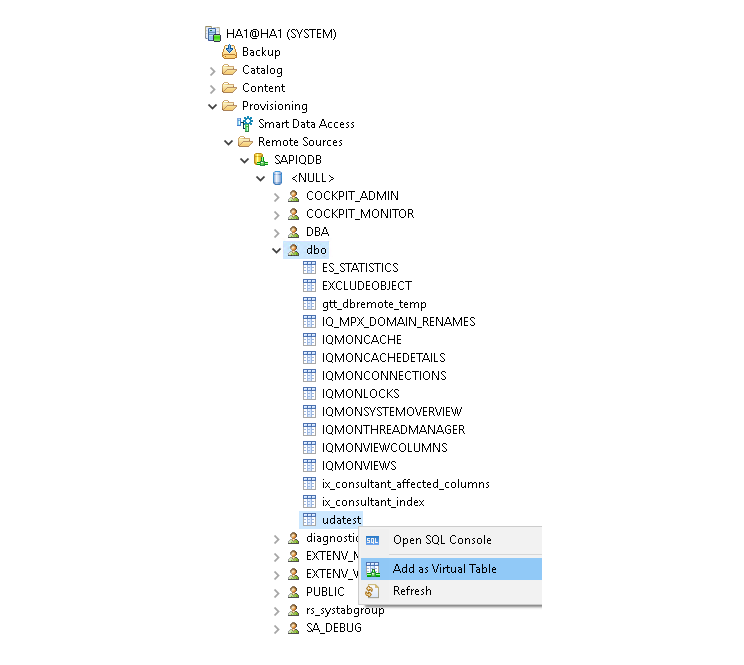
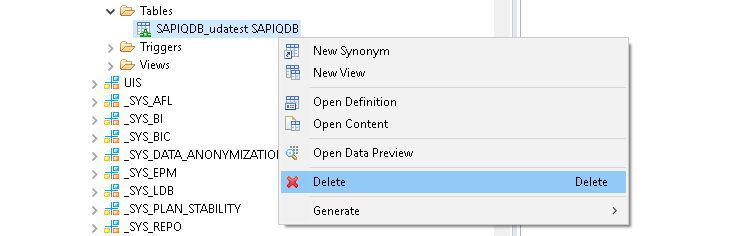
As an optional validation, expose the udatest table created in Part I as a HANA virtual table. Under the SAPIQDB remote source, navigate to dbo, right-click udatest, and select Add as Virtual Table.
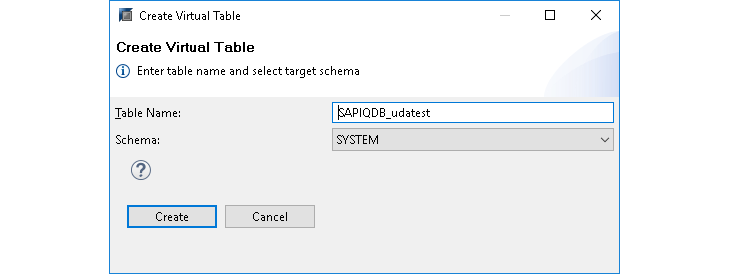
The same virtual table can be created with SQL:
SQL command
create virtual table SYSTEM."SAPIQDB_udatest" at SAPIQDB."<NULL>"."dbo"."udatest";Validate access by selecting the row inserted into SAP IQ during Part I:
SQL command
select * from SYSTEM."SAPIQDB_udatest";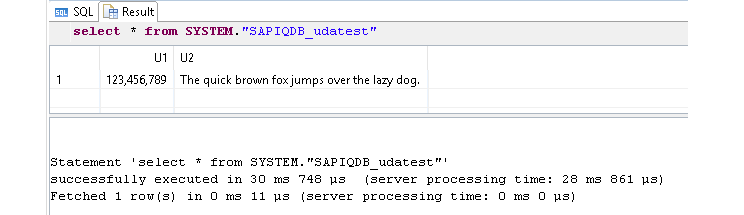
After the validation, the test virtual table can be removed.
10.2 Adjust SAPABAP1 user permissions
Connected to HANA as SYSTEM, or another user with the required privileges, grant the permissions below to the SAP database connection user. In the example environment, that user is SAPABAP1.
SQL command
GRANT CREATE VIRTUAL TABLE, DROP ON REMOTE SOURCE SAPIQDB TO "SAPABAP1";11. Configuring NLS in NetWeaver
11.1 Creating the DBCON connection to SAP IQ
Create a database connection in transaction DBCO using the following values:
DBCON values
DB Connection: SAPIQDB
DBMS: SYB
User Name: SAPBWNLS
DB password: MinhaSenha
Conn. Info: SYBASE_SERVER=servernls SYBASE_IQ_ENGINE=SAPIQSERVER SYBASE_DBNAME=SAPIQDB SYBASE_PORT=34238 SYBASE_CONTYPE=IQ SYBASE_IQ_LOAD=1 SYBASE_IQ_CESU-8=1 SYBASE_IQ_LOCKWAIT=600 SYBASE_IQ_BUFFER_SIZE=500000
Connection Limit: 3
Optimum Conns: 1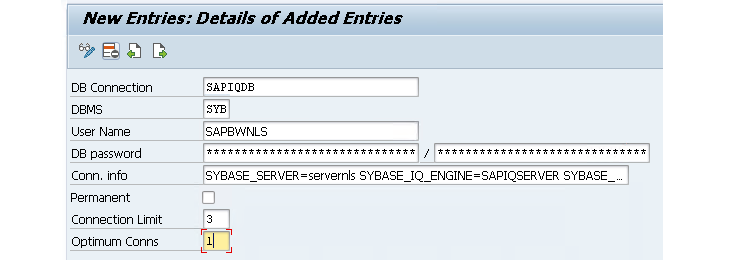
Although DBCON offers SIQ as a DBMS option, SAP Note 2181757 recommends SYB. In the example environment, this setting prevented a short dump while activating the Data Archiving Process.
Test connectivity in transaction DB02 under System Landscape → Database Connections.
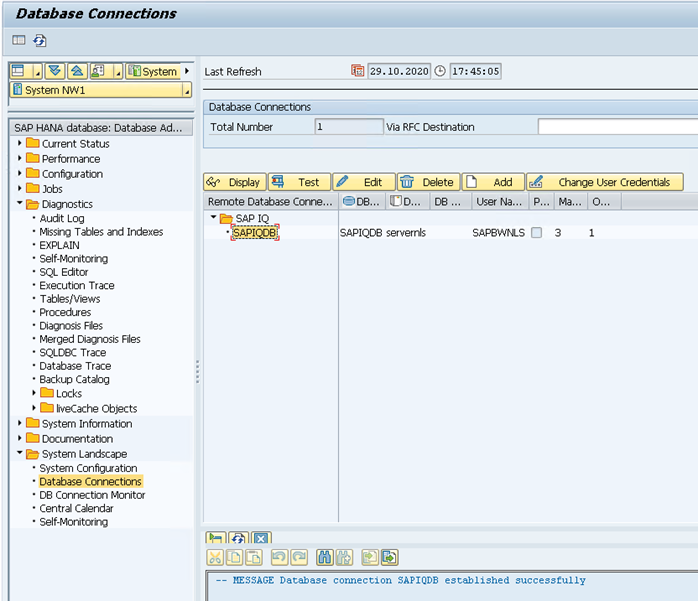
The connection can also be tested with report ADBC_TEST_CONNECTION.


11.2 Creating the NLS connection
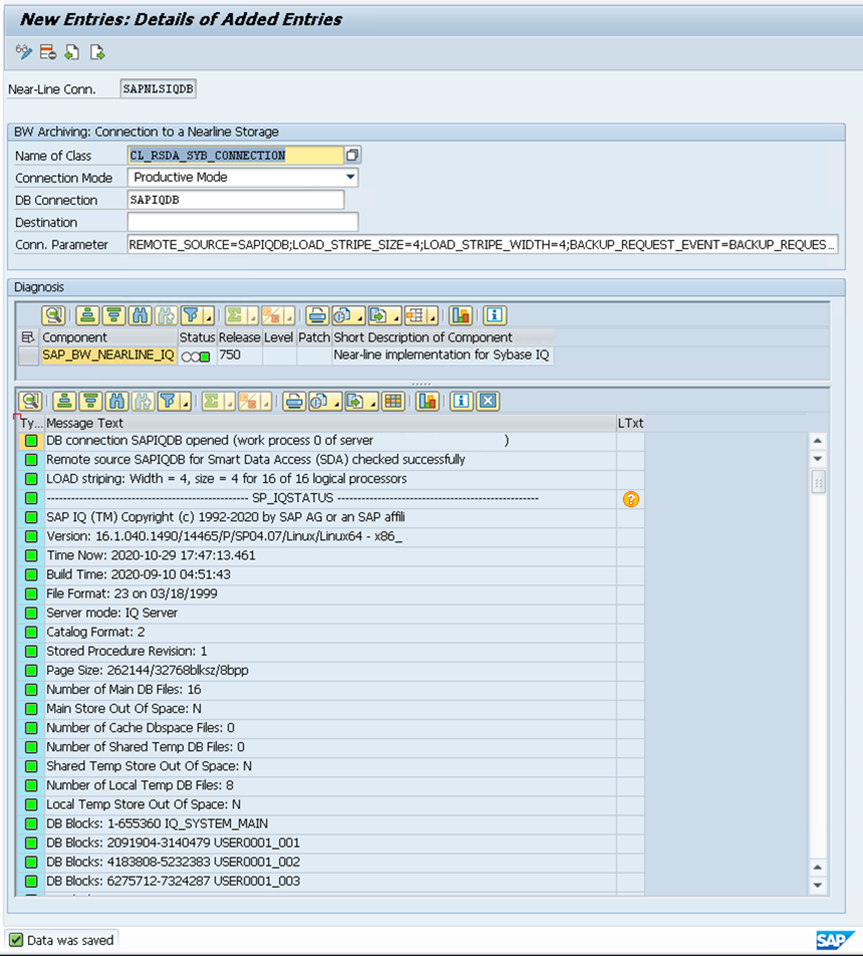
In transaction RSDANLCON, add a Near-Line Storage connection with the following values:
NLS connection values
Near-Line Conn: SAPNLSIQDB
Name of Class: CL_RSDA_SYB_CONNECTION
Connection Mode: Productive Mode
DB Connection: SAPIQDB
Conn. Parameter: REMOTE_SOURCE=SAPIQDB;LOAD_STRIPE_SIZE=4;LOAD_STRIPE_WIDTH=4;BACKUP_REQUEST_EVENT=BACKUP_REQUEST;BACKUP_WAIT_SEC=900;DEFAULT_DBSPACE=USER0001
Saving the entry triggers validations that include communication with both HANA and SAP IQ. Every validation should show a green status icon; otherwise, review the preceding configuration steps.
11.3 Setting the partitioning mode
Run report SAP_RSADMIN_MAINTAIN to change the partitioning method in SAP IQ as described in SAP Note 2190504. Set object RSDA_SYB_PARTMODE to value D.
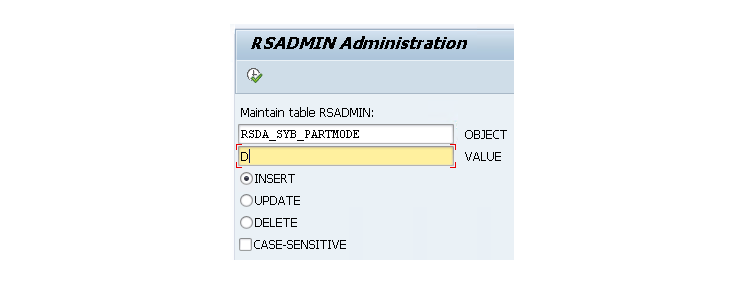
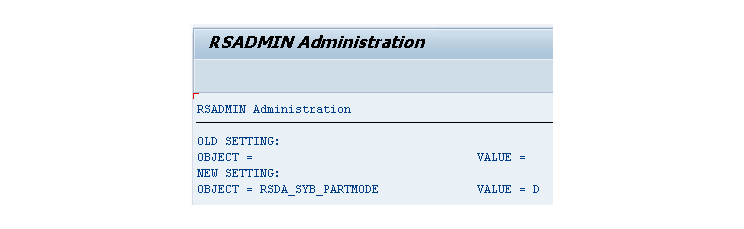
11.4 Adding the SAP IQ database to DBACOCKPIT
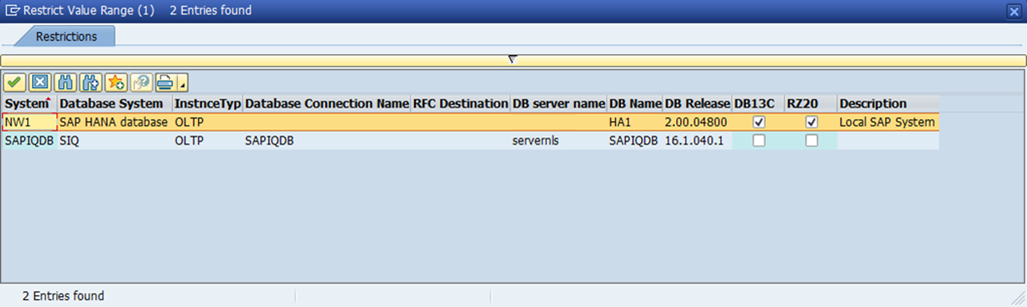
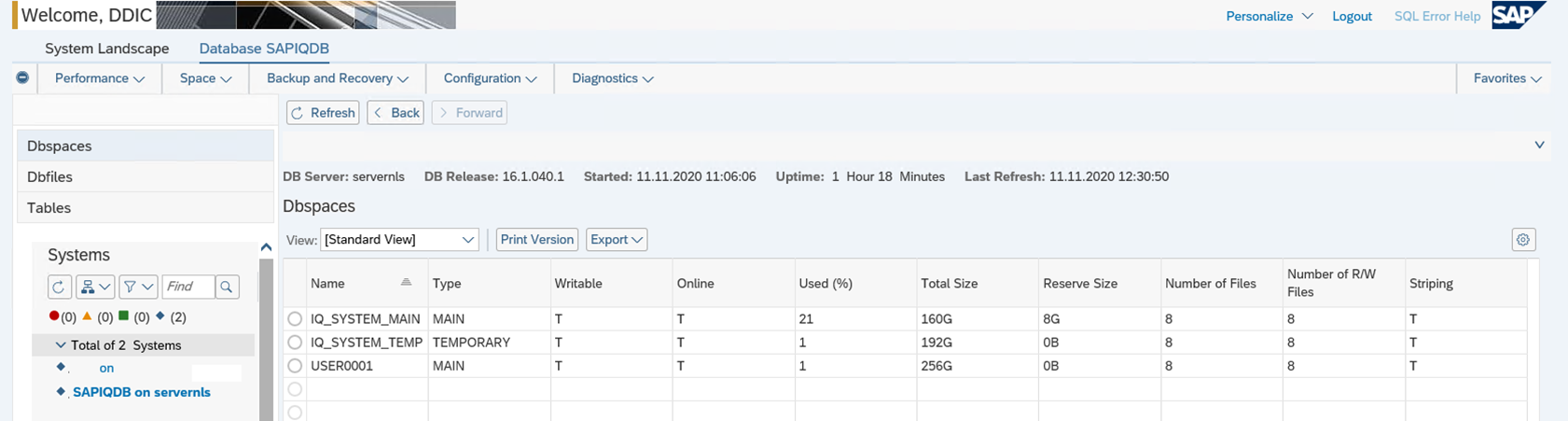
In transaction DB02, open System Configuration using the button above the current system name or through System Landscape → System Configuration.
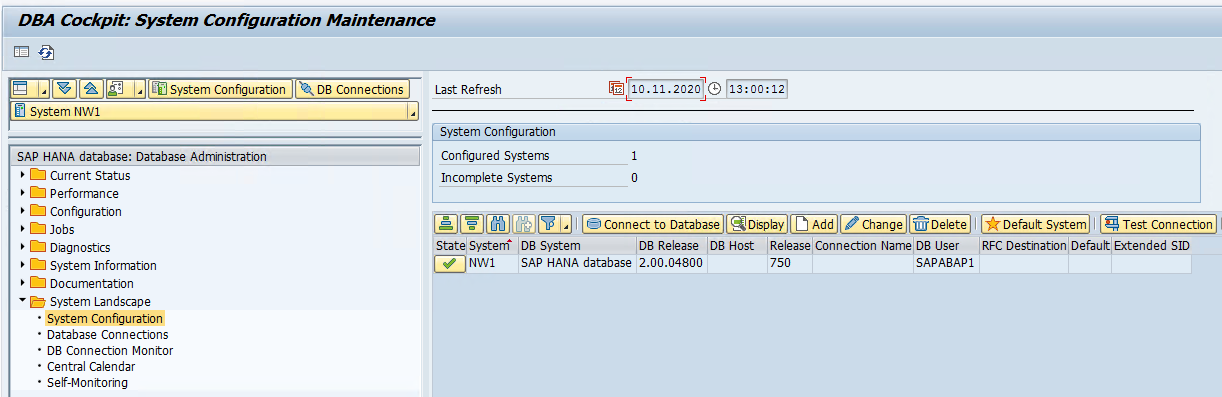
Select Add, enter SAPIQDB for both System and Database Connection, and save.
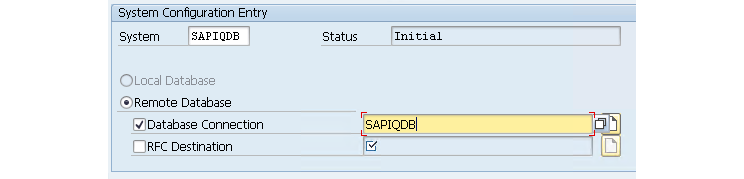
After the configuration is saved, click the current system name to select the database to manage.
12. Backup
Backups can and should be automated. The configuration described in the source article covers both scheduled backups and backups requested by BW after data movement. Whenever an archive operation is completed, SAP IQ generates an incremental backup through the configured request event.
The create_backup_artifacts.sql script from SAP Note 2741824 configures:
- An incremental-since-full backup from Monday through Saturday at 00:00, using the suffix
insf. - A full backup on Sunday at 00:00, using the suffix
full. - An on-demand backup checked every minute from 00:01 through 23:56, using the suffix
incr. The backup runs when BW writes a row toBACKUP_REQUESTthrough theBACKUP_REQUESTevent.
Change the backup target in the script from the original example path:
Original script line
DECLARE LOC_BACKUP_FOLDER VARCHAR(255) = '/usr/sap/SIQ/backup'; -- adjust the backup folder path according to your needsUse the path configured for this environment:
Updated script line
DECLARE LOC_BACKUP_FOLDER VARCHAR(255) = '/usr/sap/NLS/data/backup';Run the modified script to create the backup-related objects:
Command
dbisql -c dsn=SAPIQDB -nogui /tmp/create_backup_artifacts.sqlExpected result
sybase@servernls:~> dbisql -c dsn=SAPIQDB -nogui /tmp/create_backup_artifacts.sql
178 row(s) affected
180 row(s) affected
213 row(s) affected
191 row(s) affected
147 row(s) affected
sybase@servernls:~>
The first backup must be executed manually before the scheduled incremental backups and the backups triggered by data movement can run:
SQL command
BACKUP DATABASE FULL TO '/usr/sap/NLS/data/backup/1st.full';Expected result
(DBA)> BACKUP DATABASE FULL TO '/usr/sap/NLS/data/backup/1st.full'
Snapshot created.
(DBA)>
The example below contains the initial manual backup, one archive-triggered incremental backup, the scheduled incremental-since-full backups, and the scheduled weekly full backup.
Expected result
sybase@servernls:/usr/sap/NLS/data/backup> ls -l
total 265848
-rw-r--r-- 1 sybase sapsys 36310668 Oct 30 16:57 1st.full.1
-rw-r--r-- 1 sybase sapsys 40411748 Oct 30 16:58 20201030_165800.003892_SAPIQDB.incr.1
-rw-r--r-- 1 sybase sapsys 40411748 Oct 31 00:00 20201031_000000.001418_SAPIQDB.insf.1
-rw-r--r-- 1 sybase sapsys 36310668 Nov  1 00:00 20201101_000000.001595_SAPIQDB.full.1
-rw-r--r-- 1 sybase sapsys 39591532 Nov  2 00:00 20201102_000000.002265_SAPIQDB.insf.1
-rw-r--r-- 1 sybase sapsys 39591532 Nov  3 00:00 20201103_000000.002053_SAPIQDB.insf.1
-rw-r--r-- 1 sybase sapsys 39591532 Nov  4 00:00 20201104_000000.001777_SAPIQDB.insf.1
sybase@servernls:/usr/sap/NLS/data/backup>
The backup directory should be managed by a periodic backup-tool routine that copies completed files to durable storage and removes them after successful protection. During a restore, the filesystem must also have enough free capacity to hold every backup file required by the recovery chain.
13. Restore
This section documents an SAP IQ database restore. It is an operational recovery procedure rather than part of the initial NLS setup.
SAP Note 2741824 describes recovery scenarios for NLS only, HANA only, or both systems. The procedure below covers an NLS-only restore that applies a full backup, an incremental-since-full backup, and subsequent incremental backups to recover through the last data insertion.
An SAP IQ restore is performed through utility_db. Stop the database being restored and start the utility database:
Command
stop_iq -stop all
start_iq -n utility -x "tcpip{PORT=34238}" -su Sap123 -gd DBA -gm 1 -gp 32768
Remove the existing database files:
Command
rm -f /usr/sap/NLS/data/db/SAPIQDB.db /usr/sap/NLS/data/temp/SAPIQDB_tmp_00* /usr/sap/NLS/data/main/SAPIQDB_main_00* /usr/sap/NLS/data/user/USER000* /usr/sap/NLS/data/log/SAPIQDB.log /usr/sap/NLS/data/messages/SAPIQDB_msg.iqmsg /usr/sap/NLS/data/log/SAPIQDB_DIAG.log /usr/sap/NLS/data/log/SAPIQDB_DIAG.stderrConnect to utility_db:
Command
dbisql -c "uid=DBA;pwd=Sap123;eng=utility;dbn=utility_db" -noguiThe verify and verify compatible clauses can validate backup integrity and compatibility before restoring:
SQL command
restore database '/usr/sap/NLS/data/db/SAPIQDB.db'
from '/usr/sap/NLS/data/backup/20200322_000000.001557_SAPIQDB.full'
verify;

restore database '/usr/sap/NLS/data/db/SAPIQDB.db'
from '/usr/sap/NLS/data/backup/20200322_000000.001557_SAPIQDB.full'
verify compatible;
The source example restores the backup chain marked with arrows below. Earlier insf backups are not required once a newer incremental-since-full backup is selected. Each incr backup, however, requires the immediately preceding backup in the chain.
Backup chain
20200322_000000.001557_SAPIQDB.full.1 <-
20200322_000000.001557_SAPIQDB.full.2 <-
20200322_000000.001557_SAPIQDB.full.3 <-
20200322_000000.001557_SAPIQDB.full.4 <-
20200322_000000.001557_SAPIQDB.full.5 <-
20200322_000000.001557_SAPIQDB.full.6 <-
20200322_000000.001557_SAPIQDB.full.7 <-
20200323_000000.002157_SAPIQDB.insf.1
20200324_000000.001822_SAPIQDB.insf.1
20200325_000000.002086_SAPIQDB.insf.1 <-
20200325_134700.001788_SAPIQDB.incr.1 <-
20200325_213800.002893_SAPIQDB.incr.1 <-
Restore the full backup and map each logical database file to its target path:
Restore script: full backup
restore database '/usr/sap/NLS/data/db/SAPIQDB.db'
from '/usr/sap/NLS/data/backup/20200322_000000.001557_SAPIQDB.full'
rename IQ_SYSTEM_MAIN     to '/usr/sap/NLS/data/main/SAPIQDB_main_001.iq'
rename IQ_SYSTEM_MAIN_02  to '/usr/sap/NLS/data/main/SAPIQDB_main_002.iq'
rename IQ_SYSTEM_MAIN_03  to '/usr/sap/NLS/data/main/SAPIQDB_main_003.iq'
rename USER0001_001       to '/usr/sap/NLS/data/user/USER0001_001.iq'
rename USER0001_002       to '/usr/sap/NLS/data/user/USER0001_002.iq'
rename USER0001_003       to '/usr/sap/NLS/data/user/USER0001_003.iq'
rename USER0001_004       to '/usr/sap/NLS/data/user/USER0001_004.iq'
rename USER0001_005       to '/usr/sap/NLS/data/user/USER0001_005.iq'
rename USER0001_006       to '/usr/sap/NLS/data/user/USER0001_006.iq'
rename USER0002_001       to '/usr/sap/NLS/data/user/USER0002_001.iq'
rename USER0002_002       to '/usr/sap/NLS/data/user/USER0002_002.iq'
rename USER0002_003       to '/usr/sap/NLS/data/user/USER0002_003.iq'
rename USER0002_004       to '/usr/sap/NLS/data/user/USER0002_004.iq'
rename USER0002_005       to '/usr/sap/NLS/data/user/USER0002_005.iq'
rename USER0002_006       to '/usr/sap/NLS/data/user/USER0002_006.iq'
rename USER0002_007       to '/usr/sap/NLS/data/user/USER0002_007.iq'
rename USER0002_008       to '/usr/sap/NLS/data/user/USER0002_008.iq'
rename USER0002_009       to '/usr/sap/NLS/data/user/USER0002_009.iq'
rename USER0002_010       to '/usr/sap/NLS/data/user/USER0002_010.iq'
rename IQ_SYSTEM_TEMP     to '/usr/sap/NLS/data/temp/SAPIQDB_tmp_001.iqtmp'
rename SAPIQDB_tmp_001    to '/usr/sap/NLS/data/temp/SAPIQDB_tmp_002.iqtmp'
rename SAPIQDB_tmp_002    to '/usr/sap/NLS/data/temp/SAPIQDB_tmp_003.iqtmp'
rename SAPIQDB_tmp_003    to '/usr/sap/NLS/data/temp/SAPIQDB_tmp_004.iqtmp'
rename IQ_SYSTEM_MSG      to '/usr/sap/NLS/data/messages/SAPIQDB_msg.iqmsg'
Apply the selected incremental-since-full backup:
Restore script: INSF backup
restore database '/usr/sap/NLS/data/db/SAPIQDB.db'
from '/usr/sap/NLS/data/backup/20200325_000000.002086_SAPIQDB.insf'
rename IQ_SYSTEM_MAIN     to '/usr/sap/NLS/data/main/SAPIQDB_main_001.iq'
rename IQ_SYSTEM_MAIN_02  to '/usr/sap/NLS/data/main/SAPIQDB_main_002.iq'
rename IQ_SYSTEM_MAIN_03  to '/usr/sap/NLS/data/main/SAPIQDB_main_003.iq'
rename USER0001_001       to '/usr/sap/NLS/data/user/USER0001_001.iq'
rename USER0001_002       to '/usr/sap/NLS/data/user/USER0001_002.iq'
rename USER0001_003       to '/usr/sap/NLS/data/user/USER0001_003.iq'
rename USER0001_004       to '/usr/sap/NLS/data/user/USER0001_004.iq'
rename USER0001_005       to '/usr/sap/NLS/data/user/USER0001_005.iq'
rename USER0001_006       to '/usr/sap/NLS/data/user/USER0001_006.iq'
rename USER0002_001       to '/usr/sap/NLS/data/user/USER0002_001.iq'
rename USER0002_002       to '/usr/sap/NLS/data/user/USER0002_002.iq'
rename USER0002_003       to '/usr/sap/NLS/data/user/USER0002_003.iq'
rename USER0002_004       to '/usr/sap/NLS/data/user/USER0002_004.iq'
rename USER0002_005       to '/usr/sap/NLS/data/user/USER0002_005.iq'
rename USER0002_006       to '/usr/sap/NLS/data/user/USER0002_006.iq'
rename USER0002_007       to '/usr/sap/NLS/data/user/USER0002_007.iq'
rename USER0002_008       to '/usr/sap/NLS/data/user/USER0002_008.iq'
rename USER0002_009       to '/usr/sap/NLS/data/user/USER0002_009.iq'
rename USER0002_010       to '/usr/sap/NLS/data/user/USER0002_010.iq'
rename IQ_SYSTEM_TEMP     to '/usr/sap/NLS/data/temp/SAPIQDB_tmp_001.iqtmp'
rename SAPIQDB_tmp_001    to '/usr/sap/NLS/data/temp/SAPIQDB_tmp_002.iqtmp'
rename SAPIQDB_tmp_002    to '/usr/sap/NLS/data/temp/SAPIQDB_tmp_003.iqtmp'
rename SAPIQDB_tmp_003    to '/usr/sap/NLS/data/temp/SAPIQDB_tmp_004.iqtmp'
rename IQ_SYSTEM_MSG      to '/usr/sap/NLS/data/messages/SAPIQDB_msg.iqmsg'
Apply the first incremental backup:
Restore script: first INCR backup
restore database '/usr/sap/NLS/data/db/SAPIQDB.db'
from '/usr/sap/NLS/data/backup/20200325_134700.001788_SAPIQDB.incr'
rename IQ_SYSTEM_MAIN     to '/usr/sap/NLS/data/main/SAPIQDB_main_001.iq'
rename IQ_SYSTEM_MAIN_02  to '/usr/sap/NLS/data/main/SAPIQDB_main_002.iq'
rename IQ_SYSTEM_MAIN_03  to '/usr/sap/NLS/data/main/SAPIQDB_main_003.iq'
rename USER0001_001       to '/usr/sap/NLS/data/user/USER0001_001.iq'
rename USER0001_002       to '/usr/sap/NLS/data/user/USER0001_002.iq'
rename USER0001_003       to '/usr/sap/NLS/data/user/USER0001_003.iq'
rename USER0001_004       to '/usr/sap/NLS/data/user/USER0001_004.iq'
rename USER0001_005       to '/usr/sap/NLS/data/user/USER0001_005.iq'
rename USER0001_006       to '/usr/sap/NLS/data/user/USER0001_006.iq'
rename USER0002_001       to '/usr/sap/NLS/data/user/USER0002_001.iq'
rename USER0002_002       to '/usr/sap/NLS/data/user/USER0002_002.iq'
rename USER0002_003       to '/usr/sap/NLS/data/user/USER0002_003.iq'
rename USER0002_004       to '/usr/sap/NLS/data/user/USER0002_004.iq'
rename USER0002_005       to '/usr/sap/NLS/data/user/USER0002_005.iq'
rename USER0002_006       to '/usr/sap/NLS/data/user/USER0002_006.iq'
rename USER0002_007       to '/usr/sap/NLS/data/user/USER0002_007.iq'
rename USER0002_008       to '/usr/sap/NLS/data/user/USER0002_008.iq'
rename USER0002_009       to '/usr/sap/NLS/data/user/USER0002_009.iq'
rename USER0002_010       to '/usr/sap/NLS/data/user/USER0002_010.iq'
rename IQ_SYSTEM_TEMP     to '/usr/sap/NLS/data/temp/SAPIQDB_tmp_001.iqtmp'
rename SAPIQDB_tmp_001    to '/usr/sap/NLS/data/temp/SAPIQDB_tmp_002.iqtmp'
rename SAPIQDB_tmp_002    to '/usr/sap/NLS/data/temp/SAPIQDB_tmp_003.iqtmp'
rename SAPIQDB_tmp_003    to '/usr/sap/NLS/data/temp/SAPIQDB_tmp_004.iqtmp'
rename IQ_SYSTEM_MSG      to '/usr/sap/NLS/data/messages/SAPIQDB_msg.iqmsg'
Apply the final incremental backup:
Restore script: final INCR backup
restore database '/usr/sap/NLS/data/db/SAPIQDB.db'
from '/usr/sap/NLS/data/backup/20200325_213800.002893_SAPIQDB.incr'
rename IQ_SYSTEM_MAIN     to '/usr/sap/NLS/data/main/SAPIQDB_main_001.iq'
rename IQ_SYSTEM_MAIN_02  to '/usr/sap/NLS/data/main/SAPIQDB_main_002.iq'
rename IQ_SYSTEM_MAIN_03  to '/usr/sap/NLS/data/main/SAPIQDB_main_003.iq'
rename USER0001_001       to '/usr/sap/NLS/data/user/USER0001_001.iq'
rename USER0001_002       to '/usr/sap/NLS/data/user/USER0001_002.iq'
rename USER0001_003       to '/usr/sap/NLS/data/user/USER0001_003.iq'
rename USER0001_004       to '/usr/sap/NLS/data/user/USER0001_004.iq'
rename USER0001_005       to '/usr/sap/NLS/data/user/USER0001_005.iq'
rename USER0001_006       to '/usr/sap/NLS/data/user/USER0001_006.iq'
rename USER0002_001       to '/usr/sap/NLS/data/user/USER0002_001.iq'
rename USER0002_002       to '/usr/sap/NLS/data/user/USER0002_002.iq'
rename USER0002_003       to '/usr/sap/NLS/data/user/USER0002_003.iq'
rename USER0002_004       to '/usr/sap/NLS/data/user/USER0002_004.iq'
rename USER0002_005       to '/usr/sap/NLS/data/user/USER0002_005.iq'
rename USER0002_006       to '/usr/sap/NLS/data/user/USER0002_006.iq'
rename USER0002_007       to '/usr/sap/NLS/data/user/USER0002_007.iq'
rename USER0002_008       to '/usr/sap/NLS/data/user/USER0002_008.iq'
rename USER0002_009       to '/usr/sap/NLS/data/user/USER0002_009.iq'
rename USER0002_010       to '/usr/sap/NLS/data/user/USER0002_010.iq'
rename IQ_SYSTEM_TEMP     to '/usr/sap/NLS/data/temp/SAPIQDB_tmp_001.iqtmp'
rename SAPIQDB_tmp_001    to '/usr/sap/NLS/data/temp/SAPIQDB_tmp_002.iqtmp'
rename SAPIQDB_tmp_002    to '/usr/sap/NLS/data/temp/SAPIQDB_tmp_003.iqtmp'
rename SAPIQDB_tmp_003    to '/usr/sap/NLS/data/temp/SAPIQDB_tmp_004.iqtmp'
rename IQ_SYSTEM_MSG      to '/usr/sap/NLS/data/messages/SAPIQDB_msg.iqmsg'
In these commands, restore database identifies the destination catalog database, from identifies the backup set, and each rename clause maps a logical SAP IQ database file to its destination path.
After the restore, update the database transaction-log path:
Command
dblog -t /usr/sap/NLS/data/log/SAPIQDB.log /usr/sap/NLS/data/db/SAPIQDB.dbStop utility_db and start the restored SAPIQDB database:
Command
stop_iq -stop all
start_iq -STARTDIR /usr/sap/NLS/data/db @params.cfg -n SAPIQDB -x 'tcpip(port=2638)' /usr/sap/NLS/data/db/SAPIQDB.db
14. Conclusion
After completing these configurations, the infrastructure required for SAP BW data archiving to Near-Line Storage is ready. The next activities are to determine which data can be archived, create the archiving process, execute the archive, and adjust queries that must retrieve information from both SAP HANA and SAP IQ.