Scope of this article. This first part covers the infrastructure preparation and SAP IQ installation path. Part II will cover SAP HANA and NetWeaver settings.
1. Introduction
This step-by-step guide describes the infrastructure configuration needed to set up Near-Line Storage (NLS) in an SAP BW environment running on SAP HANA, using SAP IQ as the NLS database. Once the platform settings are complete, the BW functional team or the team responsible for data archiving can begin moving data to NLS/SAP IQ.
The sequence is based on practical implementation work and references SAP’s SAP First Guidance for SAP BW NLS/SDA with SAP IQ 16.x and the SAP Sybase IQ 16 Hardware Sizing Guide. The SAP guidance is detailed; this article organizes the activities into an implementation-oriented order.
Within this guide, NLS stores warm BW data at a lower cost than the primary database. Warm data is accessed less often than current, hot data but should remain available for reporting. For example, a prior reporting year might be warm while the current year remains hot in SAP HANA. Cold data - data only needed in exceptional situations such as an audit - is outside this article’s scope.
For each BW object archived to NLS, tables are created in SAP IQ and SAP HANA. At least one SAP HANA table is a virtual table pointing to a table in SAP IQ. When BW reporting runs, SAP HANA retrieves the relevant data from SAP IQ; during archiving, the Data Archiving Process (DAP) accesses NLS directly.
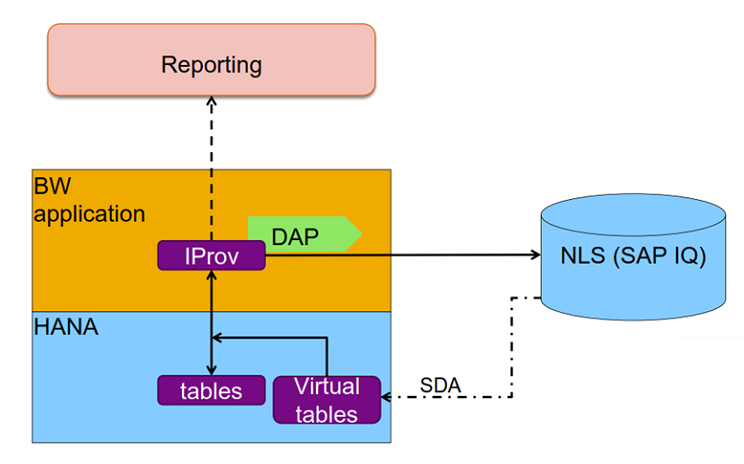
The landscape used for this walkthrough was NetWeaver 7.5 (SID: NW1) on SAP HANA 2.0 (SID: HA1), with SAP IQ 16.1 (SID: NLS) installed on a dedicated x64 server with 16 CPUs and 128 GB of memory.
The steps are deliberately detailed so administrators with limited SAP IQ exposure can follow the setup. They still assume intermediate general IT knowledge, particularly for Linux administration and infrastructure preparation.
How to read this guide
Commands appear in a code block. Where useful, the expected result is shown separately so you can validate the activity before proceeding.
Command
ls -l .profileExpected result
sybase@servernls:~> ls -l .profile
-rw-r--r-- 1 sybase sapsys 1180 Nov  9 12:15 .profile
sybase@servernls:~>
2. Installation media
The following installation media were used for the example environment:
- SAP IQ server:
IQSERV161004P_7-80002767.TGZ - SAP IQ client:
IQNC161004P_7-80002768.TGZ - SAP HANA client:
IMDB_CLIENT20_004_202-80002082.SAR - SAP HANA Smart Data Access:
IMDB_SDA200_05_0-70002151.SAR
3. OS preparation of the SAP IQ server
The following steps document the server preparation and operating-system activities required before installing SAP IQ.
3.1 Filesystem layout
Expected result
servernls:/usr/sap # df -h | grep -e Mount -e NLS
Filesystem                        Size  Used Avail
Use% Mounted on
/dev/mapper/vg_data-lv_NLS        3.0G   33M  3.0G 2% /usr/sap/NLS
/dev/mapper/vg_data-lv_NLSbackup  600G   33M  600G 1% /usr/sap/NLS/data/backup
/dev/mapper/vg_data-lv_NLSmain    190G   33M  190G 1% /usr/sap/NLS/data/main
/dev/mapper/vg_data-lv_NLStemp    230G   33M  230G 1% /usr/sap/NLS/data/temp
/dev/mapper/vg_data-lv_NLSserver   10G   33M   10G 1% /usr/sap/NLS/server
/dev/mapper/vg_data-lv_NLSuser    320G   33M  320G 1% /usr/sap/NLS/data/user
3.2 Create the sapsys group and sybase user
Command
groupadd sapsys
useradd -d /home/sybase -g sapsys -m sybase
Expected result
servernls:~ # groupadd sapsys
servernls:~ # useradd -d /home/sybase -g sapsys -m
sybase
servernls:~ #
Edit the file /home/sybase/.profile and add the line below (SAP note 2803563):
Command
export MALLOC_ARENA_MAX=1Log off/log on and confirm that the variables are being set correctly:
Command
grep MALLOC_ARENA_MAX .profile
echo $MALLOC_ARENA_MAX
Expected result
sybase@servernls:~> grep MALLOC_ARENA_MAX .profile
export MALLOC_ARENA_MAX=1
sybase@servernls:~> echo $MALLOC_ARENA_MAX
1
sybase@servernls:~>
3.3 Set filesystem permissions
Command
chown -R sybase:sapsys /usr/sap/NLS
find /usr/sap/NLS -ls
Expected result
servernls:~ # chown -R sybase:sapsys /usr/sap/NLS
servernls:~ # find /usr/sap/NLS -ls
 64  0 drwxr-xr-x   4 sybase   sapsys   32 Nov  6 09:36 /usr/sap/NLS
 67  0 drwxr-xr-x   6 sybase   sapsys   56 Nov  6 09:36 /usr/sap/NLS/data
 64  0 drwxr-xr-x   2 sybase   sapsys    6 Nov  6 09:36 /usr/sap/NLS/data/backup
 64  0 drwxr-xr-x   2 sybase   sapsys    6 Nov  6 09:36 /usr/sap/NLS/data/main
 64  0 drwxr-xr-x   2 sybase   sapsys    6 Nov  6 09:36 /usr/sap/NLS/data/temp
 64  0 drwxr-xr-x   2 sybase   sapsys    6 Nov  6 09:36 /usr/sap/NLS/data/user
 64  0 drwxr-xr-x   2 sybase   sapsys    6 Nov  6 09:36 /usr/sap/NLS/server
servernls:~ #
4. Installation of SAP IQ Server
There are some tweaks to allow installation in graphical mode. It is also necessary for a terminal that has an X11 server such as MobaXterm.
As root execute the commands below:
Command
chmod 755 /root
chmod o+r /root/.Xauthority
echo $DISPLAY
Expected result
servernls:/tmp/syb_inst/ebf29663 # chmod 755 /root
servernls:/tmp/syb_inst/ebf29663 # chmod o+r
/root/.Xauthority
servernls:/tmp/syb_inst/ebf29663 # echo $DISPLAY
localhost:10.0
servernls:/tmp/syb_inst/ebf29663 #
Using the sybase user, merge the X authentication data and export the DISPLAY variable ("localhost:10.0" should match the result of "echo $DISPLAY" command above):
Command
touch ~/.Xauthority
xauth merge /root/.Xauthority
export DISPLAY="localhost:10.0"
Expected result
sybase@servernls:~> touch ~/.Xauthority
sybase@servernls:~> xauth merge /root/.Xauthority
sybase@servernls:~> export DISPLAY="localhost:10.0"
sybase@servernls:~>
To make sure that your configuration is working properly, the xclock and xeyes commands can be used. A new window for each command should open if everything is correct:
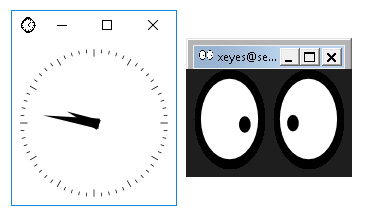
After the terminal is configured to allow installation using the graphical interface, unzip the IQSERV161004P_7-80002767.TGZ media. The ebf29663 directory will be extracted with the setup.bin installer:
Expected result
sybase@servernls:/tmp/syb_inst> ls -l ebf29663
total 91096
drwxr-xr-x 1 sybase sapsys      418 Sep 29 17:48 archives
-rwxr-xr-x 1 sybase sapsys    98024 Sep 29 17:48 Cover.SP04.07.txt
-rwxr-xr-x 1 sybase sapsys     2560 Sep 29 17:48 installer.properties
-rwxr-xr-x 1 sybase sapsys      377 Sep 29 17:48 readme_ja.txt
-rwxr-xr-x 1 sybase sapsys      298 Sep 29 17:48 readme.txt
-rwxr-xr-x 1 sybase sapsys      251 Sep 29 17:48 readme_zh.txt
-rwxr-xr-x 1 sybase sapsys 93166009 Sep 29 17:48 setup.bin
drwxr-xr-x 1 sybase sapsys       20 Sep 29 17:48 sysam_utilities
sybase@servernls:/tmp/syb_inst>
Start the installation process:
Expected result
sybase@servernls:/tmp/syb_inst/ebf29663> ./setup.bin
Preparing to install
Extracting the JRE from the installer archive...
Unpacking the JRE...
Extracting the installation resources from the
installer archive...
Configuring the installer for this system's
environment...
Launching installer...
SAP IQ installation follows the traditional “Next, next, finish” process, so only a few settings differ from the defaults. The original article showed the options used at each step of the installation wizard.
Edit /home/sybase/.profile file and add the lines below:
Command
. /usr/sap/NLS/server/IQ.sh
export PATH=$PATH:/usr/sap/NLS/server/shared/SAPJRE-8_1_062_64BIT/bin
export ODBC_IQ=libdbodbc17_r.so
Log off/log on and validate the variables:
Command
grep -e IQ.sh -e PATH -e ODBC_IQ .profile
echo $PATH
echo $ODBC_IQ
Expected result
sybase@servernls:~> grep -e IQ.sh -e PATH -e ODBC_IQ
.profile
. /usr/sap/NLS/server/IQ.sh
export PATH=$PATH:/usr/sap/NLS/server/shared/SAPJRE-8_1_062_64BIT/bin
export ODBC_IQ=libdbodbc17_r.so
sybase@servernls:~> echo $PATH
/usr/sap/NLS/server/IQ-16_1/bin64:/usr/sap/NLS/server/COCKPIT-4/bin:/usr/sap/NLS/server/OCS-16_0/bin:/home/sybase/bin:/usr/local/bin:/usr/bin:/bin:/usr/bin/X11:/usr/games:/usr/sap/NLS/server/shared/SAPJRE-8_1_062_64BIT/bin
sybase@servernls:~> echo $ODBC_IQ
libdbodbc17_r.so
sybase@servernls:~>
5. Creation of the IQ database
Create /usr/sap/NLS/data/log, /usr/sap/NLS/data/messages, /usr/sap/NLS/data/db directories:
Command
mkdir -p /usr/sap/NLS/data/log /usr/sap/NLS/data/messages /usr/sap/NLS/data/dbExpected result
sybase@servernls:~> mkdir -p /usr/sap/NLS/data/log /usr/sap/NLS/data/messages /usr/sap/NLS/data/db
sybase@servernls:~>
Change to the /usr/sap/NLS/data/db directory:
Command
cd /usr/sap/NLS/data/dbExpected result
sybase@servernls:~> cd /usr/sap/NLS/data/db
sybase@servernls:/usr/sap/NLS/data/db>
Start the utility_db database:
Command
start_iq -n utility -x "tcpip{PORT=34238}" -su Sap123 -c 2048m -gp 32768 -iqmc 2048Expected result
sybase@servernls:/usr/sap/NLS/data/db> start_iq -n
utility -x "tcpip{PORT=34238}" -su Sap123 -c 2048m -gp 32768 -iqmc 2048
Starting server utility on servernls at port  (11/06
10:11:22)
Run Directory       : /usr/sap/NLS/data/db
Server Executable   : /usr/sap/NLS/server/IQ-16_1/bin64/iqsrv16
Server Output Log   : /usr/sap/NLS/server/IQ-16_1/logfiles/utility.0001.srvlog
Server Version      : 16.1.040.1490/SP04.07
Open Client Version : 16.0 SP03 PL06
User Parameters     : '-n' 'utility' '-x'
'tcpip{PORT=34238}' '-su' 'Sap123' '-c' '2048m' '-gp'
'32768' '-iqmc' '2048'
Default Parameters  : -gc 20 -gd all -gl all -gm 10 -
ti 4400 -gn 25
I. 11/06 10:11:25.027807 SAP IQ
I. 11/06 10:11:25.028026 Version 16.1
I. 11/06 10:11:25.028067 (64bit mode)
I. 11/06 10:11:25.028080 Copyright 1992-2020 by SAP
AG or an SAP affiliate company. All rights reserved
I. 11/06 10:11:25.028095 Copyright (c) 2020 SAP SE or
an SAP affiliate company.
I. SAP IQ
Version 16.1
(64bit mode)
Copyright 1992-2020 by SAP AG or an SAP affiliate
company. All rights reserved
Copyright (c) 2020 SAP SE or an SAP affiliate
company.
11/06 10:11:25.028110 All rights reserved.
I. 11/06 10:11:25.028257 Use of this software is
governed by the SAP Software Use Rights Agreement.
All rights reserved.
Use of this software is governed by the SAP Software
Use Rights Agreement.
I. 11/06 10:11:25.028380 Refer to
http://www.sap.com/about/agreements.html.
I. 11/06 10:11:25.028426
I. 11/06 10:11:25.028451 Processors detected: 16
logical processor(s) on 16 core(s) on 1 physical
processor(s)
I. 11/06 10:11:25.028556 This server is licensed to
use: all logical processors in the system
Refer to http://www.sap.com/about/agreements.html.
Processors detected: 16 logical processor(s) on 16
core(s) on 1 physical processor(s)
I. 11/06 10:11:25.028592 Processors in use by server:
16 logical processor(s) on 16 core(s) on 1 physical
processor(s)
This server is licensed to use: all logical
processors in the system
Processors in use by server: 16 logical processor(s)
on 16 core(s) on 1 physical processor(s)
I. 11/06 10:11:25.028638 Running Linux 4.12.14-
122.17-default #1 SMP Wed Feb 26 10:31:05 UTC 2020
(6090a75) on X86_64
Running Linux 4.12.14-122.17-default #1 SMP Wed Feb
26 10:31:05 UTC 2020 (6090a75) on X86_64
I. 11/06 10:11:25.028826 Server built for X86_64
processor architecture
Server built for X86_64 processor architecture
I. 11/06 10:11:25.073157 2084600K of memory used for
caching
2084600K of memory used for caching
I. 11/06 10:11:25.073542 Minimum cache size:
2097152K, maximum cache size: 2097152K
I. 11/06 10:11:25.073710 Using a maximum page size of
32768 bytes
Minimum cache size: 2097152K, maximum cache size:
2097152K
Using a maximum page size of 32768 bytes
I. 11/06 10:11:25.089979 Multiprogramming level: 25
Multiprogramming level: 25
I. 11/06 10:11:25.090313 Automatic tuning of
multiprogramming level is disabled
Automatic tuning of multiprogramming level is
disabled
=====================================================
========
IQ server starting with:
     10 connections         (       -gm )
     42 cmd resources       ( -iqgovern )
    893 threads             (     -iqmt )
    512 Kb thread stack size   (   -iqtss  )
  457216 Kb thread memory size ( -iqmt * -iqtss )
     16 IQ number of cpus  ( -iqnumbercpus )
      0 MB maximum size of IQMSG file ( -iqmsgsz )
      0 copies of IQMSG file archives ( -iqmsgnum )
   2048 MB maximum size of main buffer cache ( -iqmc
)
     64 MB maximum size of temp buffer cache ( -iqtc
)
   2048 MB maximum size of large memory pool ( -iqlm
)
      0 MB maximum size of heap memory ( -iqmem )
   2048 MB maximum size of RLV memory ( -iqrlvmem )
=====================================================
========
I. 11/06 10:11:25.276666 Database server started at
Fri Nov 06 2020 10:11
HOS_MEMMGR: Heap memory tracking is enabled.
[hos_InMemMsgLog] Using perThreadBufferLength=1048576
bytes...
Database server started at Fri Nov 06 2020 10:11
I. 11/06 10:11:25.277538 Trying to start SharedMemory
link ...
Trying to start SharedMemory link ...
I. 11/06 10:11:25.278181     SharedMemory link
started successfully
    SharedMemory link started successfully
I. 11/06 10:11:25.278259 Trying to start TCPIP link
...
Trying to start TCPIP link ...
I. 11/06 10:11:25.279052 Starting on port 34238
Starting on port 34238
I. 11/06 10:11:30.280260     TCPIP link started
successfully
    TCPIP link started successfully
I. 11/06 10:11:30.281993 Now accepting requests
Now accepting requests
New process id is 20238
Server started successfully
sybase@servernls:/usr/sap/NLS/data/db>
To create the database, create a script with the content below. In this example, the DBA user's password will be MyPassword. This password is set at database creation time and can be changed at any time.
SQL script
CREATE DATABASE '/usr/sap/NLS/data/db/SAPIQDB.db'
LOG ON '/usr/sap/NLS/data/log/SAPIQDB.log'
CASE RESPECT
PAGE SIZE 32768
COLLATION 'CESU8BIN' ENCODING 'CESU8'
DBA USER 'DBA'
DBA PASSWORD 'MyPassword'
BLANK PADDING ON
JCONNECT ON
IQ PATH '/usr/sap/NLS/data/main/SAPIQDB_main_001.iq'
IQ SIZE 20480
IQ PAGE SIZE 262144
IQ RESERVE 8192
BLOCK SIZE 32768
MESSAGE PATH '/usr/sap/NLS/data/messages/SAPIQDB_msg.iqmsg'
TEMPORARY PATH '/usr/sap/NLS/data/temp/SAPIQDB_tmp_001.iqtmp'
TEMPORARY SIZE 24576
Run the created script:
Command
dbisql -c "uid=DBA;pwd=Sap123;eng=utility;dbn=utility_db" -nogui /tmp/create_database.sqlExpected result
sybase@servernls:/usr/sap/NLS/data/db> dbisql -c "uid=DBA;pwd=Sap123;eng=utility;dbn=utility_db" -nogui /tmp/create_database.sql
CHAR collation sequence:
CESU8BIN(CaseSensitivity=Respect)
CHAR character set encoding:  CESU-8
NCHAR collation sequence:
UCA(CaseSensitivity=UpperFirst;AccentSensitivity=Resp
ect;PunctuationSensitivity=Primary)
NCHAR character set encoding:  UTF-8
Database is not encrypted
Creating system tables
Creating system views
Setting option values
sybase@servernls:/usr/sap/NLS/data/db>
Stop the utility_db database with the stop_iq command:
Expected result
sybase@servernls:/usr/sap/NLS/data/db> stop_iq
Checking system ...
The following 1 server(s) are owned by 'sybase'
## Owner          PID   Started  CPU Time  Additional Information
-- ---------  -------  --------  --------  ------------------------------------
1: sybase       20238     10:11  00:00:14  SVR:utility DB:none PORT:
              /usr/sap/NLS/server/IQ-16_1/bin64/iqsrv16 -n utility -x tcpip{PORT=34238} -su Sap123 -c 2048m -gp 32768 -iqmc 2048 -gc 20 -gd all -gl all -gm 10 -ti
--
        Please note that 'stop_iq' will shut down aserver completely
        without regard for users, connections, or load process status.
        For more control, use the 'dbstop' utility, which has options
        that control stopping servers based on active connections.
Do you want to stop the server displayed above <Y/N>?
y
Shutting down server (20238) ...
Checkpointing server (20238) ...
Server shutdown.
sybase@servernls:/usr/sap/NLS/data/db>
Create the server configuration file with the contents below. The file name must be SAPIQDB.cfg.
Configuration file
#/* -----------------------------------------------------------*/
#/* @(#)SAPIQDB.cfg */
#/* SAP IQ database instance "SAPIQDB" - CONFIGURATION */
#/* -----------------------------------------------------------*/
## Name of the IQ engine, e.g. s<server>_<SID>_<instance>
-n SAPIQSERVER
## cache memory for catalog store. Set to 2 - 8 times size of the catalog file
-cl 256m
-ch 4096m
-gc 20
-gd all
## Use 80% of existing RAM and reserve 1/3 for every parameter
-iqlm 32768
-iqtc 32768
-iqmc 32768
# Specifies the number of SAP Sybase IQ threads to create.
-iqmt 968
## we have 4x4 core CPU hardware this forces on Intel to do more parallel
-iqnumbercpus 16
-iqpartition 16
-iqgovern 42
## network
-x tcpip{port=34238}
#### improving SQL anywhere interface for NLS queries
-gss 8192
-iqtss 8192
## Number of connections in the IQ/SQL anywhere server/stack size/page size
-gn 192
-gm 128
-gp 32768
#Disconnects inactive connections.
-ti 4400
## we force clients to use large size as default
#Sets the maximum size of communication packets.
-p 64000
## Displays diagnostic communication messages, and other messages, for troubleshooting purposes.
-z
## enable SAP IQ SSL network and database support
# -ec TLS(IDENTITY=server.id)
# -ep | -ek
## location of the temp dir for SQL anywhere (SAP Note 2084237)
-dt /usr/sap/NLS/data/temp
## LOG DIAGNOSTIC and Name of log file
-o /usr/sap/NLS/data/log/SAPIQDB_DIAG.log
-zo /usr/sap/NLS/data/log/SAPIQDB_PROTOCOL.log
## Number of log files and size of iqmessagefile in mb
-iqmsgsz 64
-iqmsgnum 16
-zn 5
-zs 10m
Also, create a link called params.cfg pointing to the generated file (Cockpit requirement):
Command
ln -s SAPIQDB.cfg params.cfg
ls -l
Expected result
sybase@servernls:/usr/sap/NLS/data/db> ln -s
SAPIQDB.cfg params.cfg
sybase@servernls:/usr/sap/NLS/data/db> ls -l
total 17028
lrwxrwxrwx 1 sybase sapsys       11 Nov  6 10:46 params.cfg -> SAPIQDB.cfg
-rw-r--r-- 1 sybase sapsys     1554 Nov  6 10:45 SAPIQDB.cfg
-r--r--r-- 1 sybase sapsys 17432576 Nov  6 10:44 SAPIQDB.db
sybase@servernls:/usr/sap/NLS/data/db>
Start the created server/database. As the database initialization generates lots of information, I've copied here the snippets that I found most relevant.
Command
start_iq -STARTDIR /usr/sap/NLS/data/db @params.cfg -n SAPIQDB -x 'tcpip(port=2638)' /usr/sap/NLS/data/db/SAPIQDB.dbExpected result
sybase@servernls:/usr/sap/NLS/data/db> start_iq -STARTDIR /usr/sap/NLS/data/db @params.cfg -n SAPIQDB
-x 'tcpip(port=2638)' /usr/sap/NLS/data/db/SAPIQDB.db
Starting server SAPIQSERVER on servernls at port 2638
(11/06 10:49:51)
Run Directory       : /usr/sap/NLS/data/db
Server Executable   : /usr/sap/NLS/server/IQ-16_1/bin64/iqsrv16
Server Output Log   :
/usr/sap/NLS/data/log/SAPIQDB_DIAG.log
Server Version      : 16.1.040.1490/SP04.07
Open Client Version : 16.0 SP03 PL06
User Parameters     : '@params.cfg' '-n' 'SAPIQDB' '-
x' 'tcpip(port=2638)'
'/usr/sap/NLS/data/db/SAPIQDB.db'
Default Parameters  : -gl all
I. 11/06 10:49:54.034075 1: -n
I. 11/06 10:49:54.034309 2: SAPIQSERVER
I. 11/06 10:49:54.034438 3: -cl
I. 11/06 10:49:54.034680 4: 256m
1: -n
2: SAPIQSERVER
3: -cl
I. 11/06 10:49:54.034858 4: 256m
5: -ch
I. 11/06 10:49:54.035225 6: 4096m
5: -ch
I. 11/06 10:49:54.035323 7: -gc
6: 4096m
I. 11/06 10:49:54.035409 8: 207: -gc
I. 11/06 10:49:54.035507 8: 20
9: -gd
I. 11/06 10:49:54.035683 10: all9: -gd
I. 11/06 10:49:54.035801 11: -iqlm10: all
I. 11/06 10:49:54.036022 12: 3276811: -iqlm
I. 11/06 10:49:54.036153 13: -iqtc12: 32768
I. 11/06 10:49:54.036278 14: 3276813: -iqtc
I. 11/06 10:49:54.036374 15: -iqmc14: 32768
I. 11/06 10:49:54.036470 15: -iqmc
16: 32768
I. 11/06 10:49:54.036611 17: -iqmt16: 32768
I. 11/06 10:49:54.036743 17: -iqmt
18: 968
I. 11/06 10:49:54.036875 18: 968
19: -iqnumbercpus
I. 11/06 10:49:54.037011 20: 1619: -iqnumbercpus
I. 11/06 10:49:54.037138 21: -iqpartition20: 16
I. 11/06 10:49:54.037255 22: 1621: -iqpartition
I. 11/06 10:49:54.037381 23: -iqgovern22: 16
I. 11/06 10:49:54.037477 23: -iqgovern
24: 42
I. 11/06 10:49:54.037607 25: -x24: 42
I. 11/06 10:49:54.037719 26: tcpip{port=34238}25: -x
I. 11/06 10:49:54.037821 26: tcpip{port=34238}
27: -gss
I. 11/06 10:49:54.037952 28: 819227: -gss
I. 11/06 10:49:54.038055 29: -iqtss28: 8192
I. 11/06 10:49:54.038181 30: 819229: -iqtss
I. 11/06 10:49:54.038291 31: -gn30: 8192
I. 11/06 10:49:54.038408 32: 19231: -gn
I. 11/06 10:49:54.038502 33: -gm32: 192
I. 11/06 10:49:54.038630 34: 12833: -gm
I. 11/06 10:49:54.038734 35: -gp34: 128
I. 11/06 10:49:54.038865 36: 3276835: -gp
I. 11/06 10:49:54.038974 37: -ti36: 32768
I. 11/06 10:49:54.039073 38: 440037: -ti
I. 38: 4400
11/06 10:49:54.039185 39: -p
I. 11/06 10:49:54.039315 39: -p
40: 64000
I. 11/06 10:49:54.039442 41: -z40: 64000
I. 11/06 10:49:54.039548 42: -dt41: -z
I. 11/06 10:49:54.039650 42: -dt
43: /usr/sap/NLS/data/temp
I. 11/06 10:49:54.039778 44: -o43:
/usr/sap/NLS/data/temp
I. 11/06 10:49:54.039888 44: -o
45: /usr/sap/NLS/data/log/SAPIQDB_DIAG.log
I. 11/06 10:49:54.039997 46: -zo45:
/usr/sap/NLS/data/log/SAPIQDB_DIAG.log
I. 11/06 10:49:54.040108 47:
/usr/sap/NLS/data/log/SAPIQDB_PROTOCOL.log
46: -zo
I. 11/06 10:49:54.040212 48: -iqmsgsz47:
/usr/sap/NLS/data/log/SAPIQDB_PROTOCOL.log
I. 11/06 10:49:54.040312 49: 6448: -iqmsgsz
I. 11/06 10:49:54.040408 50: -iqmsgnum49: 64
I. 11/06 10:49:54.040503 51: 1650: -iqmsgnum
I. 11/06 10:49:54.040601 52: -zn51: 16
I. 11/06 10:49:54.040696 53: 552: -zn
I. 11/06 10:49:54.040794 54: -zs53: 5
I. 54: -zs
11/06 10:49:54.040909 55: 10m
I. 11/06 10:49:54.041062 55: 10m
56: -n
I. 11/06 10:49:54.041194 56: -n
57: SAPIQDB
I. 11/06 10:49:54.041305 58: -x57: SAPIQDB
I. 11/06 10:49:54.041403 59: tcpip(port=2638)58: -x
I. 11/06 10:49:54.041529 60:
/usr/sap/NLS/data/db/SAPIQDB.db59: tcpip(port=2638)
I. 11/06 10:49:54.041624 61: -gl60:
/usr/sap/NLS/data/db/SAPIQDB.db
I. 11/06 10:49:54.041719 62: all61: -gl
I. 11/06 10:49:54.041834 62: all
63: -hn
I. 11/06 10:49:54.041969 64: 563: -hn
I. 11/06 10:49:54.042064
64: 5
I. 11/06 10:49:54.042165 SAP IQ
I. 11/06 10:49:54.042263 Version 16.1SAP IQ
I. 11/06 10:49:54.042361 (64bit mode)Version 16.1
I. 11/06 10:49:54.042458 Copyright 1992-2020 by SAP
AG or an SAP affiliate company. All rights
reserved(64bit mode)
I. 11/06 10:49:54.042558 Copyright 1992-2020 by SAP
AG or an SAP affiliate company. All rights reserved
Copyright (c) 2020 SAP SE or an SAP affiliate
company.
I. 11/06 10:49:54.042688 All rights
reserved.Copyright (c) 2020 SAP SE or an SAP
affiliate company.
I. All rights reserved.
11/06 10:49:54.042806 Use of this software is
governed by the SAP Software Use Rights Agreement.
I. 11/06 10:49:54.042979 Use of this software is
governed by the SAP Software Use Rights Agreement.
Refer to http://www.sap.com/about/agreements.html.
I. Refer to http://www.sap.com/about/agreements.html.
11/06 10:49:54.043102
I.
11/06 10:49:54.043213 Processors detected: 16 logical
processor(s) on 16 core(s) on 1 physical processor(s)
I. Processors detected: 16 logical processor(s) on 16
core(s) on 1 physical processor(s)
11/06 10:49:54.043373 This server is licensed to use:
all logical processors in the system
I. This server is licensed to use: all logical
processors in the system
11/06 10:49:54.043503 Processors in use by server: 16
logical processor(s) on 16 core(s) on 1 physical
processor(s)
I. Processors in use by server: 16 logical
processor(s) on 16 core(s) on 1 physical processor(s)
11/06 10:49:54.043635 Running Linux 4.12.14-122.17-
default #1 SMP Wed Feb 26 10:31:05 UTC 2020 (6090a75)
on X86_64
I. Running Linux 4.12.14-122.17-default #1 SMP Wed
Feb 26 10:31:05 UTC 2020 (6090a75) on X86_64
11/06 10:49:54.043756 Server built for X86_64
processor architecture
Server built for X86_64 processor architecture
I. 11/06 10:49:54.067020 263804K of memory used for
caching
I. 11/06 10:49:54.067308 Minimum cache size: 263584K,
maximum cache size: 4194304K
263804K of memory used for caching
I. 11/06 10:49:54.067498 Using a maximum page size of
32768 bytes
Minimum cache size: 263584K, maximum cache size:
4194304K
Using a maximum page size of 32768 bytes
I. 11/06 10:49:54.101963 Multiprogramming level: 192
I. 11/06 10:49:54.102132 Automatic tuning of
multiprogramming level is disabled
Multiprogramming level: 192
Automatic tuning of multiprogramming level is
disabled
I. 11/06 10:49:54.102462 IPv6 support enabled
IPv6 support enabled
=====================================================
========
IQ server starting with:
    128 connections         (       -gm )
     42 cmd resources       ( -iqgovern )
    968 threads             (     -iqmt )
   8192 Kb thread stack size   (   -iqtss  )
  7929856 Kb thread memory size ( -iqmt * -iqtss )
     16 IQ number of cpus  ( -iqnumbercpus )
     64 MB maximum size of IQMSG file ( -iqmsgsz )
     16 copies of IQMSG file archives ( -iqmsgnum )
  32768 MB maximum size of main buffer cache ( -iqmc
)
  32768 MB maximum size of temp buffer cache ( -iqtc
)
  32768 MB maximum size of large memory pool ( -iqlm
)
      0 MB maximum size of heap memory ( -iqmem )
   2048 MB maximum size of RLV memory ( -iqrlvmem )
=====================================================
========
E. 11/06 10:49:54.315950 WARNING: Failed to load PAM
library - PAMUA will be disabled
WARNING: Failed to load PAM library - PAMUA will be
disabled
I. 11/06 10:49:54.332091 Starting database "SAPIQDB"
(/usr/sap/NLS/data/db/SAPIQDB.db) at Fri Nov 06 2020
10:49
HOS_MEMMGR: Heap memory tracking is enabled.
[hos_InMemMsgLog] Using perThreadBufferLength=1048576
bytes...
Starting database "SAPIQDB"
(/usr/sap/NLS/data/db/SAPIQDB.db) at Fri Nov 06 2020
10:49
I. 11/06 10:49:55.663857 UTC time zone offset for
"SAPIQDB" set to -180 minutes
I. 11/06 10:49:55.664343 Transaction log:
/usr/sap/NLS/data/log/SAPIQDB.log
I. 11/06 10:49:54. IQ OpenDatabase, checkpointblock:
131090, recover: 1
I. 11/06 10:49:54. Using AIO based prefetch manager
I. 11/06 10:49:55. Using AIO based prefetch manager
I. 11/06 10:49:55. 140110919739136 [MpxTrace-GFLSHT]-
stcxtlib/st_globalFlMgr.cxx:00075 The Diagnostic
toggle value for st_globalFlMgr is set to 0
UTC time zone offset for "SAPIQDB" set to -180
minutes
Transaction log: /usr/sap/NLS/data/log/SAPIQDB.log
I. 11/06 10:49:55.679957 Starting checkpoint of
"SAPIQDB" (SAPIQDB.db) at Fri Nov 06 2020 10:49
Starting checkpoint of "SAPIQDB" (SAPIQDB.db) at Fri
Nov 06 2020 10:49
I. 11/06 10:49:55.805528 Finished checkpoint of
"SAPIQDB" (SAPIQDB.db) at Fri Nov 06 2020 10:49
Finished checkpoint of "SAPIQDB" (SAPIQDB.db) at Fri
Nov 06 2020 10:49
I. 11/06 10:49:58.612872 Update previous log GUID to:
cf3e6306-2003-11eb-8000-be1e14d5f0f6
Update current log GUID to :ab0519fc-2004-11eb-8000-
895503642702
I. 11/06 10:49:55. 140110919739136 [MpxTrace-GFLSHT]-
stcxtlib/st_globalFlMgr.cxx:00075 The Diagnostic
toggle value for st_globalFlMgr is set to 0
I. 11/06 10:49:57. IQ OpenDatabase, checkpointblock:
131098, recover: 0
I. 11/06 10:49:58. Using AIO based prefetch manager
I. 11/06 10:49:58. Using AIO based prefetch manager
Using licenses from:
/usr/local/flexlm/licenses/license.dat
Checked out graced license for 1 IQ_CORE (2020.0910)
will expire Thu 04 Feb 2021 12:00:00 AM -03.
Failed to obtain license(s) for IQ_CORE feature from
license file(s) or server(s).
Cannot find license file.
 The license files (or license server system network
addresses) attempted are listed below.
License feature name:  IQ_CORE
License filename:      /usr/sap/NLS/server/SYSAM-2_0/licenses:/usr/sap/NLS/data/db
License search path:   /usr/sap/NLS/server/SYSAM-2_0/licenses:/usr/sap/NLS/data/db
FlexNet Licensing error:-1,359.  System Error: 2 "No
such file or directory"
WARNING: IQ functionality that requires the IQ_CORE
license will be disabled on Thu 04 Feb 2021 12:00:00
AM -03, unless a suitable IQ_CORE license is obtained
before that date.
Update previous log GUID to: cf3e6306-2003-11eb-8000-
be1e14d5f0f6
Update current log GUID to :ab0519fc-2004-11eb-8000-
895503642702
I. 11/06 10:49:58.689941 Database "SAPIQDB"
(SAPIQDB.db) started at Fri Nov 06 2020 10:49
Database "SAPIQDB" (SAPIQDB.db) started at Fri Nov 06
2020 10:49
I. 11/06 10:49:58.729899 IQ Server SAPIQSERVER.
IQ Server SAPIQSERVER.
I. 11/06 10:49:58.731010 Starting checkpoint of
"SAPIQDB" (SAPIQDB.db) at Fri Nov 06 2020 10:49
Starting checkpoint of "SAPIQDB" (SAPIQDB.db) at Fri
Nov 06 2020 10:49
I. 11/06 10:49:58.887984 Finished checkpoint of
"SAPIQDB" (SAPIQDB.db) at Fri Nov 06 2020 10:49
Finished checkpoint of "SAPIQDB" (SAPIQDB.db) at Fri
Nov 06 2020 10:49
Database server started at Fri Nov 06 2020 10:49
Trying to start SharedMemory link ...
I. 11/06 10:49:58.895430 Database server started at
Fri Nov 06 2020 10:49
I. 11/06 10:49:58.895740 Trying to start SharedMemory
link ...
I. 11/06 10:49:58.896852     SharedMemory link
started successfully
I. 11/06 10:49:58.897069 Trying to start TCPIP link
...
    SharedMemory link started successfully
Trying to start TCPIP link ...
I. 11/06 10:49:58.898164 Starting on port 34238
Starting on port 34238
I. 11/06 10:49:58.898570 Starting TCPIP listener on
IP address (::):34238
Starting TCPIP listener on IP address (::):34238
I. 11/06 10:49:58.899181 Starting TCPIP listener on
IP address 0.0.0.0:34238
Starting TCPIP listener on IP address 0.0.0.0:34238
I. 11/06 10:49:58.899432 Starting UDP listener on IP
address 0.0.0.0:34238
Starting UDP listener on IP address 0.0.0.0:34238
I. 11/06 10:49:58.899704 Starting UDP listener on IP
address (::):34238
Starting UDP listener on IP address (::):34238
I. 11/06 10:49:58.899964 Starting UDP listener on IP
address 0.0.0.0:2638
Starting UDP listener on IP address 0.0.0.0:2638
I. 11/06 10:49:58.900199 Starting UDP listener on IP
address (::):2638
Starting UDP listener on IP address (::):2638
I. 11/06 10:49:58.900574 Looking for server with name
sapiqserver
I. 11/06 10:49:58.900630 Sending broadcast to find
server
Looking for server with name sapiqserver
I. 11/06 10:49:58.900673 Using broadcast address of:
127.255.255.255
Sending broadcast to find server
Using broadcast address of: 127.255.255.255
I. 11/06 10:49:58.900793 Looking for server with name
sapiqserver
Looking for server with name sapiqserver
I. 11/06 10:49:58.900842 Sending broadcast to find
server
I. 11/06 10:49:58.900896 Using broadcast address of:
192.168.82.255
Sending broadcast to find server
Using broadcast address of: 192.168.82.255
I. 11/06 10:49:58.901031 Looking for server with name
sapiqserver
Looking for server with name sapiqserver
I. 11/06 10:49:58.901108 Sending broadcast to find
server
I. 11/06 10:49:58.901149 Using broadcast address of:
ff02::1%2
Sending broadcast to find server
Using broadcast address of: ff02::1%2
I. 11/06 10:50:03.901199     Server not found (no
reply received)
I. 11/06 10:50:03.901509     TCPIP link started
successfully
    Server not found (no reply received)
    TCPIP link started successfully
Now accepting requests
I. 11/06 10:50:03.903034 Now accepting requests
New process id is 21557
Server started successfully
sybase@servernls:/usr/sap/NLS/data/db>
Validate connectivity. The password is “MyPassword” or the password that was set during the creation of the database.
Command
dbisql -c "uid=DBA;eng=SAPIQSERVER;dbn=SAPIQDB" -noguiExpected result
sybase@servernls:/usr/sap/NLS/data/db> dbisql -c
"uid=DBA;eng=SAPIQSERVER;dbn=SAPIQDB" -nogui
Password for DBA:
(DBA)> quit
sybase@servernls:/usr/sap/NLS/data/db>
6. Configure the SAP IQ Cockpit service
As root, create the link below:
Command
ln -s /usr/bin/env /bin/envExpected result
servernls:~ # ln -s /usr/bin/env /bin/env
servernls:~ #
If the Cockpit service has been started, stop it. With the sybase user:
Command
$SYBASE/COCKPIT-4/bin/cockpit.sh -stopExpected result
sybase@servernls:~> $SYBASE/COCKPIT-4/bin/cockpit.sh
-stop
Cockpit server is stopped
sybase@servernls:~>
Start it in the background:
Command
nohup $SYBASE/COCKPIT-4/bin/cockpit.sh > ~/cockpit-console.out &Expected result
sybase@servernls:~> nohup $SYBASE/COCKPIT-4/bin/cockpit.sh > cockpit-console.out &
[1] 23844
sybase@servernls:~> nohup: ignoring input and
redirecting stderr to stdout
sybase@servernls:~>
The login URL can be found in the ~/cockpit-console.out file:
Expected result
sybase@servernls:~> grep https cockpit-console.out
https://servernls:4283/cockpit
sybase@servernls:~>
Create a DSN pointing to the created database:
Command
iqdsn -y -w "SAPIQDB" -c "UID=DBA;PWD=MyPassword;ServerName=SAPIQSERVER;LINKS=tcpip(host=servernls;port=34238)"Expected result
sybase@servernls:~> iqdsn -y -w "SAPIQDB" -c "UID=DBA;PWD=MyPassword;ServerName=SAPIQSERVER;LINKS=tcpip(host=servernls;port=34238)"
SAP IQ Data Source Utility Version 16.1.40.1490
Configuration "SAPIQDB" written to file
/home/sybase/.odbc.ini
sybase@servernls:~>
Validate connection using DSN:
Command
dbping -d -c dsn=SAPIQDBExpected result
sybase@servernls:~> dbping -d -c dsn=SAPIQDB
SQL Anywhere Server Ping Utility Version 17.0.10.1490
Connected to SQL Anywhere 16.1.40.1490 server
"SAPIQSERVER" and database "SAPIQDB"
at address 192.168.82.102.
Ping database successful.
sybase@servernls:~>
Create the necessary roles for administration using the IQ Cockpit:
Command
dbisql -c dsn=SAPIQDB -nogui $SYBASE/COCKPIT-4/plugins/IQ-CMAP/cockpit_monitor_role_based_privileges_setup.sql
dbisql -c dsn=SAPIQDB -nogui $SYBASE/COCKPIT-4/plugins/IQ-CMAP/cockpit_monitor_authority_based_privileges_setup.sql
Expected result
sybase@servernls:~> dbisql -c dsn=SAPIQDB -nogui
$SYBASE/COCKPIT-4/plugins/IQ-CMAP/cockpit_monitor_role_based_privileges_setup.sql
sybase@servernls:~> dbisql -c dsn=SAPIQDB -nogui
$SYBASE/COCKPIT-4/plugins/IQ-CMAP/cockpit_monitor_authority_based_privileges_setup
.sql
sybase@servernls:~>
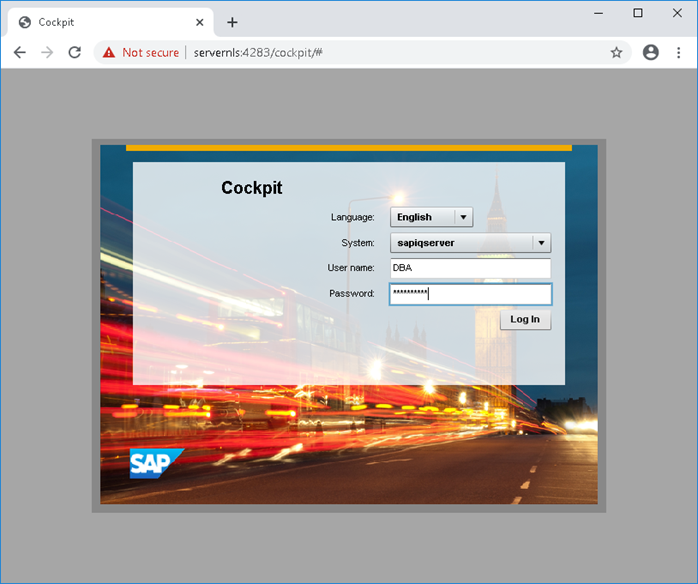
To register agents in the IQ Cockpit, access the URL "https://servernls:4283/cockpit", authenticate with the DBA user and password "MyPassword":
Navigate to EXPLORE -> IQ Servers -> select the SAPIQSERVER server and click on the down arrow:
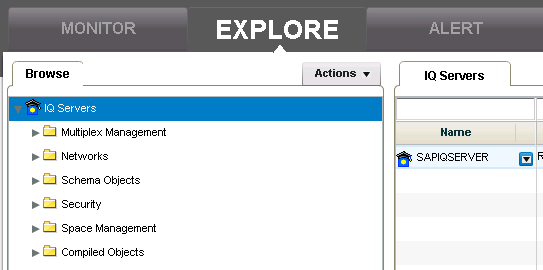
First select Register Agent...:
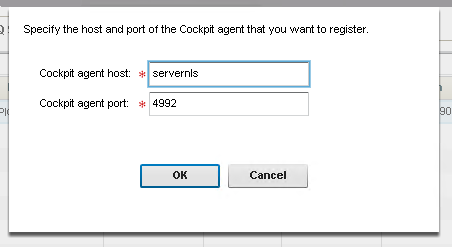
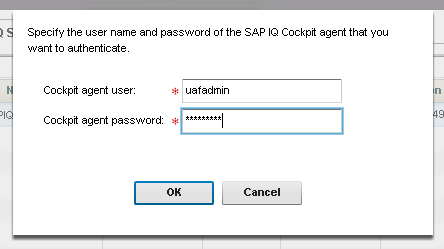
Then click the down arrow again and this time select Authenticate Agent... (user uafadmin password is Sybase4me):
To create the “technical user” of the IQ Cockpit, grant execute permission in the TechnicalUserCreate.sh script:
Command
ls -l $SYBASE/COCKPIT-4/plugins/IQ-CMAP/TechnicalUserCreate.sh
chmod u+x $SYBASE/COCKPIT-4/plugins/IQ-CMAP/TechnicalUserCreate.sh
ls -l $SYBASE/COCKPIT-4/plugins/IQ-CMAP/TechnicalUserCreate.sh
Expected result
sybase@servernls:~> ls -l $SYBASE/COCKPIT-4/plugins/IQ-CMAP/TechnicalUserCreate.sh
-rw-r--r-- 1 sybase sapsys 1816 May  4  2020
/usr/sap/NLS/server/COCKPIT-4/plugins/IQ-CMAP/TechnicalUserCreate.sh
sybase@servernls:~> chmod u+x $SYBASE/COCKPIT-4/plugins/IQ-CMAP/TechnicalUserCreate.sh
sybase@servernls:~> ls -l $SYBASE/COCKPIT-4/plugins/IQ-CMAP/TechnicalUserCreate.sh
-rwxr--r-- 1 sybase sapsys 1816 May  4  2020
/usr/sap/NLS/server/COCKPIT-4/plugins/IQ-CMAP/TechnicalUserCreate.sh
sybase@servernls:~>
Change to the directory and run the TechnicalUserCreate.sh script
Command
cd $SYBASE/COCKPIT-4/plugins/IQ-CMAP
./TechnicalUserCreate.sh
Expected result
sybase@servernls:~> cd $SYBASE/COCKPIT-4/plugins/IQ-CMAP
sybase@servernls:/usr/sap/NLS/server/COCKPIT-4/plugins/IQ-CMAP> ./TechnicalUserCreate.sh
Do you wish to connect to local database? (y/n)n
Enter Technical User Login:iqtech
Enter Technical User Password:
Enter resource name for which to use this technical
user:SAPIQSERVER
Technical user store is updated successfully.
sybase@servernls:/usr/sap/NLS/server/COCKPIT-4/plugins/IQ-CMAP>
Here, “iqtech” is the technical username and “SAPIQSERVER” is the SAP IQ server name, not the operating-system hostname.
7. SAP IQ configuration
7.1 Create the application user
Create the application user that will connect to the database. In this example, the user is SAPBWNLS. Connect to the database using the dbisql syntax below:
Command
dbisql -c dsn=SAPIQDB -noguiAnd execute the commands below. I also used the password "MyPassword" but it must be changed to a secure one:
SQL command
create user SAPBWNLS identified by 'MyPassword' login policy root;
grant READCLIENTFILE to SAPBWNLS;
grant MANAGE any EVENT to SAPBWNLS;
grant MONITOR to SAPBWNLS;
grant ROLE SYS_AUTH_RESOURCE_ROLE to SAPBWNLS with no ADMIN OPTION;
grant CREATE ANY OBJECT to SAPBWNLS with no ADMIN OPTION;
grant CREATE TABLE to SAPBWNLS with no ADMIN OPTION;
grant RESOURCE to SAPBWNLS;
Expected result
sybase@servernls:~> dbisql -c dsn=SAPIQDB -nogui
(DBA)> create user SAPBWNLS identified by 'MyPassword' login policy root;
(DBA)> grant READCLIENTFILE to SAPBWNLS;
(DBA)> grant MANAGE any EVENT to SAPBWNLS;
(DBA)> grant MONITOR to SAPBWNLS;
(DBA)> grant ROLE SYS_AUTH_RESOURCE_ROLE to SAPBWNLS with no ADMIN OPTION;
(DBA)> grant CREATE ANY OBJECT to SAPBWNLS with no ADMIN OPTION;
(DBA)> grant CREATE TABLE to SAPBWNLS with no ADMIN OPTION;
(DBA)> grant RESOURCE to SAPBWNLS;
(DBA)> quit
sybase@servernls:~>
7.2 Configure SAP IQ server options
Validate the current options with the "sp_iqcheckoptions" procedure (omitted the "connection_authentication" option line for easier viewing):
Expected result
sybase@servernls:~> dbisql -c dsn=SAPIQDB -nogui
(DBA)> sp_iqcheckoptions
User_name Option_name               Current_value  Default_value Option_type
-----------------------------------------------------------------------------
DBA       checkpoint_time           20             60            Temporary
DBA       compression               Off            6             Temporary
DBA       progress_messages         Formatted      Off           Temporary
DBA       sql_flagger_error_level   Off            W             Temporary
DBA       sql_flagger_warning_level Off            W             Temporary
DBA       suppress_tds_debugging    On             Off           Temporary
DBA       time_zone_adjustment      -180           0             Temporary
(8 rows)
(DBA)> quit
sybase@servernls:~>
Create a script with the parameters below:
SQL script
set option public.allow_read_client_file='ON';
set option public.blocking='ON';
set option public.ansi_substring='OFF';
set option public.chained='OFF';
set option public.default_kb_per_stripe='128';
set option public.force_no_scroll_cursors='ON';
set option public.main_reserved_dbspace_mb='30720';
set option public.temp_reserved_dbspace_mb='15360';
set option public.iq_system_main_recovery_threshold='5';
set option public.max_cartesian_result='0';
set option public.string_rtruncation='OFF';
set option public.enable_lob_variables='ON';
Run it:
Command
dbisql -c dsn=SAPIQDB -nogui /tmp/options.sqlExpected result
sybase@servernls:~> dbisql -c dsn=SAPIQDB -nogui
/tmp/options.sql
sybase@servernls:~>
Connect to the database and validate the new options with the procedure "sp_iqcheckoptions":
Expected result
sybase@servernls:~> dbisql -c dsn=SAPIQDB -nogui
(DBA)> sp_iqcheckoptions
User_name Option_name                       Current_value  Default_value Option_type
------------------------------------------------------------------------------------
DBA       Default_KB_Per_Stripe             128            1024          Permanent
PUBLIC    Default_KB_Per_Stripe             128            1024          Permanent
DBA       Enable_LOB_Variables              On             OFF           Permanent
PUBLIC    Enable_LOB_Variables              ON             OFF           Permanent
DBA       Force_No_Scroll_Cursors           On             OFF           Permanent
PUBLIC    Force_No_Scroll_Cursors           ON             OFF           Permanent
DBA       IQ_SYSTEM_MAIN_RECOVERY_THRESHOLD 5              1             Permanent
PUBLIC    IQ_SYSTEM_MAIN_RECOVERY_THRESHOLD 5              1             Permanent
DBA       Main_Reserved_DBSpace_MB          30720          200           Permanent
PUBLIC    Main_Reserved_DBSpace_MB          30720          200           Permanent
DBA       Max_Cartesian_Result              0              100000000     Permanent
PUBLIC    Max_Cartesian_Result              0              100000000     Permanent
DBA       Temp_Reserved_DBSpace_MB          15360          200           Permanent
PUBLIC    Temp_Reserved_DBSpace_MB          15360          200           Permanent
DBA       allow_read_client_file            On             Off           Permanent
PUBLIC    allow_read_client_file            ON             Off           Permanent
DBA       ansi_substring                    Off            On            Permanent
PUBLIC    ansi_substring                    OFF            On            Permanent
DBA       blocking                          On             Off           Permanent
PUBLIC    blocking                          ON             Off           Permanent
DBA       chained                           Off            On            Permanent
PUBLIC    chained                           OFF            On            Permanent
DBA       checkpoint_time                   20             60            Temporary
DBA       compression                       Off            6             Temporary
DBA       progress_messages                 Formatted      Off           Temporary
DBA       sql_flagger_error_level           Off            W             Temporary
DBA       sql_flagger_warning_level         Off            W             Temporary
DBA       string_rtruncation                Off            On            Permanent
PUBLIC    string_rtruncation                OFF            On            Permanent
DBA       suppress_tds_debugging            On             Off           Temporary
DBA       time_zone_adjustment              -180           0             Temporary
(32 rows)
(DBA)> quit
sybase@servernls:~>
7.3 Create and extend dbspaces
Create a script with the content below:
SQL script
-- USER0001 - 256 Gb
CREATE DBSPACE USER0001 USING
FILE USER0001_001 '/usr/sap/NLS/data/user/USER0001_001.iq' size 32768,
FILE USER0001_002 '/usr/sap/NLS/data/user/USER0001_002.iq' size 32768,
FILE USER0001_003 '/usr/sap/NLS/data/user/USER0001_003.iq' size 32768,
FILE USER0001_004 '/usr/sap/NLS/data/user/USER0001_004.iq' size 32768,
FILE USER0001_005 '/usr/sap/NLS/data/user/USER0001_005.iq' size 32768,
FILE USER0001_006 '/usr/sap/NLS/data/user/USER0001_006.iq' size 32768,
FILE USER0001_007 '/usr/sap/NLS/data/user/USER0001_007.iq' size 32768,
FILE USER0001_008 '/usr/sap/NLS/data/user/USER0001_008.iq' size 32768
STRIPING ON
STRIPESIZEKB 512;
-- IQ_SYSTEM_TEMP = 192 Gb
ALTER DBSPACE IQ_SYSTEM_TEMP ADD
FILE IQ_SYSTEM_TEMP_02 '/usr/sap/NLS/data/temp/SAPIQDB_tmp_002.iqtmp' size 24576,
FILE IQ_SYSTEM_TEMP_03 '/usr/sap/NLS/data/temp/SAPIQDB_tmp_003.iqtmp' size 24576,
FILE IQ_SYSTEM_TEMP_04 '/usr/sap/NLS/data/temp/SAPIQDB_tmp_004.iqtmp' size 24576,
FILE IQ_SYSTEM_TEMP_05 '/usr/sap/NLS/data/temp/SAPIQDB_tmp_005.iqtmp' size 24576,
FILE IQ_SYSTEM_TEMP_06 '/usr/sap/NLS/data/temp/SAPIQDB_tmp_006.iqtmp' size 24576,
FILE IQ_SYSTEM_TEMP_07 '/usr/sap/NLS/data/temp/SAPIQDB_tmp_007.iqtmp' size 24576,
FILE IQ_SYSTEM_TEMP_08 '/usr/sap/NLS/data/temp/SAPIQDB_tmp_008.iqtmp' size 24576;
-- SYSTEM_MAIN = 160 Gb
ALTER DBSPACE IQ_SYSTEM_MAIN ADD
FILE IQ_SYSTEM_MAIN_02 '/usr/sap/NLS/data/main/SAPIQDB_main_002.iq' size 20480,
FILE IQ_SYSTEM_MAIN_03 '/usr/sap/NLS/data/main/SAPIQDB_main_003.iq' size 20480,
FILE IQ_SYSTEM_MAIN_04 '/usr/sap/NLS/data/main/SAPIQDB_main_004.iq' size 20480,
FILE IQ_SYSTEM_MAIN_05 '/usr/sap/NLS/data/main/SAPIQDB_main_005.iq' size 20480,
FILE IQ_SYSTEM_MAIN_06 '/usr/sap/NLS/data/main/SAPIQDB_main_006.iq' size 20480,
FILE IQ_SYSTEM_MAIN_07 '/usr/sap/NLS/data/main/SAPIQDB_main_007.iq' size 20480,
FILE IQ_SYSTEM_MAIN_08 '/usr/sap/NLS/data/main/SAPIQDB_main_008.iq' size 20480;
Run it:
Command
dbisql -c dsn=SAPIQDB -nogui /tmp/extend.sqlExpected result
sybase@servernls:~> dbisql -c dsn=SAPIQDB -nogui
/tmp/extend.sql
sybase@servernls:~>
7.4 Configure options for the new dbspace
Connect to IQ using dbisql:
Command
dbisql -c dsn=SAPIQDB -noguiMake DBSPACE USER0001 the default one for public and SAPBWNLS users:
SQL command
set option public.default_dbspace='USER0001';
set option SAPBWNLS.default_dbspace='USER0001';
Expected result
sybase@servernls:~> dbisql -c dsn=SAPIQDB -nogui
(DBA)> set option public.default_dbspace='USER0001';
(DBA)> set option
SAPBWNLS.default_dbspace='USER0001';
(DBA)> quit
sybase@servernls:~>
Optional: validate the options above. Connect to the database with dbisql and execute the sp_iqcheckoptions procedure. I'm omitting the values already validated from the result below.
Expected result
sybase@servernls:~> dbisql -c dsn=SAPIQDB -nogui
(DBA)> sp_iqcheckoptions
User_name Option_name         Current_value    Default_value Option_type
------------------------------------------------------------------------
...
DBA       default_dbspace     USER0001                       Permanent
PUBLIC    default_dbspace     USER0001                       Permanent
SAPBWNLS  default_dbspace     USER0001                       Permanent
...
(35 rows)
(DBA)> quit
sybase@servernls:~>
7.5 Licenses
The SAP note “2628620 - How to create Sybase IQ license keys - SAP ONE Support Launchpad” shows a step-by-step how to generate the license in SAP One Launchpad. SAP Note “2372218 - Request IQ licenses for SAP-NLS solution - SAP BW with SAP IQ Nearline-Storage” provides specific information about the license required to use IQ as NLS.
I generated three licenses for my environment with the features: IQ_CORE, IQ_VLDBMGMT,and IQ_UDA (which includes the IQ_LOB license). With the generated licenses, I copied the contents of each one of them and pasted it into a file called licenses.lic inside the /usr/sap/NLS/server/SYSAM-2_0/licenses/ directory.
For validation, I restarted SAP IQ. Before the license was installed, the boot log showed:
Expected result
I. 11/06 10:49:58. Using AIO based prefetch manager
Using licenses from:
/usr/local/flexlm/licenses/license.dat
Checked out graced license for 1 IQ_CORE (2020.0910)
will expire Thu 04 Feb 2021 12:00:00 AM -03.
Failed to obtain license(s) for IQ_CORE feature from
license file(s) or server(s).
Cannot find license file.
 The license files (or license server system network
addresses) attempted are listed below.
License feature name:  IQ_CORE
License filename:      /usr/sap/NLS/server/SYSAM-2_0/licenses:/usr/sap/NLS/data/db
License search path:   /usr/sap/NLS/server/SYSAM-2_0/licenses:/usr/sap/NLS/data/db
FlexNet Licensing error:-1,359.  System Error: 2 "No such file or directory"
WARNING: IQ functionality that requires the IQ_CORE license will be disabled on Thu 04 Feb 2021 12:00:00AM -03, unless a suitable IQ_CORE license is obtained before that date.
Update previous log GUID to: cf3e6306-2003-11eb-8000-be1e14d5f0f6
After the license was installed, the boot log showed:
Expected result
I. 11/06 13:04:18. Using AIO based prefetch manager
Using licenses from: /usr/sap/NLS/server/SYSAM-2_0/licenses/licenses.lic:/usr/sap/NLS/data/db/*.lic
Checked out license for 16 IQ_CORE (2021.12310/permanent/02CC B79A 8944 31FB).
Update previous log GUID to: ab0519fc-2004-11eb-8000-895503642702
Activate IQ licenses:
SQL command
sp_iqlmconfig 'allow', 'ALL';
sp_iqlmconfig 'allow', 'IQ_VLDBMGMT', '4';
Expected result
(DBA)> sp_iqlmconfig 'allow', 'ALL';
Property                             Value
--------------------------------------------------------
Licence Notice                       xxxxxxxxxxxxxxx
Edition                              EE
License Type                         CP
Application Type                     IQ
IQ_CORE License Count in use         16 (CPU corebased)
Optional license in use : IQ_UDA     No (Allowed)
Optional license in use : IQ_LOB     No (Allowed)
Optional license in use: IQ_SECURITY No (Allowed)
Optional license in use: IQ_MPXNODE  No
Optional license in use: IQ_VLDBMGMT No (Allowed)
IQ_VLDBMGMT License Count in use     0 (Max Allowed :0)
Optional license in use: IQ_UDF      No (Allowed)
Optional license in use: IQ_IDA      No (Allowed)
Optional license in use: IQ_URIDA    No (Allowed)
Email Severity                       NONE
SMTP Host                            smtp
SMTP Port                            25
Email Sender                         sybase
Email Recipients                     sybase
(19 rows)
(DBA)> sp_iqlmconfig 'allow', 'IQ_VLDBMGMT', '4';
Property                             Value
--------------------------------------------------------
Licence Notice                       xxxxxxxxxxxxxxx
Edition                              EE
License Type                         CP
Application Type                     IQ
IQ_CORE License Count in use         16 (CPU core based)
Optional license in use : IQ_UDA     No (Allowed)
Optional license in use : IQ_LOB     No (Allowed)
Optional license in use: IQ_SECURITY No (Allowed)
Optional license in use: IQ_MPXNODE  No
Optional license in use: IQ_VLDBMGMT No (Allowed)
IQ_VLDBMGMT License Count in use     0 (Max Allowed :4)
Optional license in use: IQ_UDF      No (Allowed)
Optional license in use: IQ_IDA      No (Allowed)
Optional license in use: IQ_URIDA    No (Allowed)
Email Severity                       NONE
SMTP Host                            smtp
SMTP Port                            25
Email Sender                         sybase
Email Recipients                     sybase
(19 rows)
(DBA)>
Test object creation:
SQL command
CREATE TABLE dbo.udatest (U1 integer NOT NULL, U2 long varchar NULL, PRIMARY KEY(U1));
CREATE TEXT INDEX udaidx ON dbo.udatest(U2) CONFIGURATION default_char;
Expected result
(DBA)> CREATE TABLE dbo.udatest (U1 integer NOT NULL,U2 long varchar NULL, PRIMARY KEY(U1));
(DBA)> CREATE TEXT INDEX udaidx ON dbo.udatest(U2) CONFIGURATION default_char;
(DBA)>
Validate the creation of these objects:
SQL command
sp_iqdbspaceobjectinfo USER0001;Expected result
(DBA)> sp_iqdbspaceobjectinfo USER0001;
dbspace_name dbspace_id object_type owner object_name object_id   id columns indexes metadata primary_key unique_constraint foreign_key partitions
--------------------------------------------------------------------------------------------------------------------------------------------------
USER0001          16387 table       dbo   udatest          5013 1709 2/2     1/1     Y                  1 0/0               0/0         0/0
(1 rows)
(DBA)>
Grant select permission on the table to the SAPBWNLS user (will be used in connectivity validation):
SQL command
grant select on udatest to SAPBWNLSExpected result
(DBA)> grant select on udatest to SAPBWNLS
(DBA)>
Insert a test record into the newly created table:
SQL command
insert into dbo.udatest (U1,U2) values (123456789,'The quick brown fox jumps over the lazy dog.')Expected result
(DBA)> insert into dbo.udatest (U1,U2) values (123456789,'The quick brown fox jumps over the lazy dog.')
1 row(s) inserted
(DBA)>
After the creation of the above objects, when checking the licenses again, IQ_UDA and IQ_LOB must have Yes:
SQL command
sp_iqlmconfig;Expected result
(DBA)> sp_iqlmconfig 'allow', 'ALL';
Property                             Value
--------------------------------------------------------
Licence Notice                       xxxxxxxxxxxxxxx
Edition                              EE
License Type                         CP
Application Type                     IQ
IQ_CORE License Count in use         16 (CPU core based)
Optional license in use : IQ_UDA     Yes(Allowed)
Optional license in use : IQ_LOB     Yes(Allowed)
Optional license in use: IQ_SECURITY No (Allowed)
Optional license in use: IQ_MPXNODE  No
Optional license in use: IQ_VLDBMGMT No (Allowed)
IQ_VLDBMGMT License Count in use     0 (Max Allowed :4)
Optional license in use: IQ_UDF      No (Allowed)
Optional license in use: IQ_IDA      No (Allowed)
Optional license in use: IQ_URIDA    No (Allowed)
Email Severity                       NONE
SMTP Host                            smtp
SMTP Port                            25
Email Sender                         sybase
Email Recipients                     sybase
(19 rows)
(DBA)>